




















Try a look head to toe
See yourself in a full outfit from a lookbook photo, pose and all, before you shop.
Put your face and hair on any body: keep the pose, outfit and scene of the second photo.
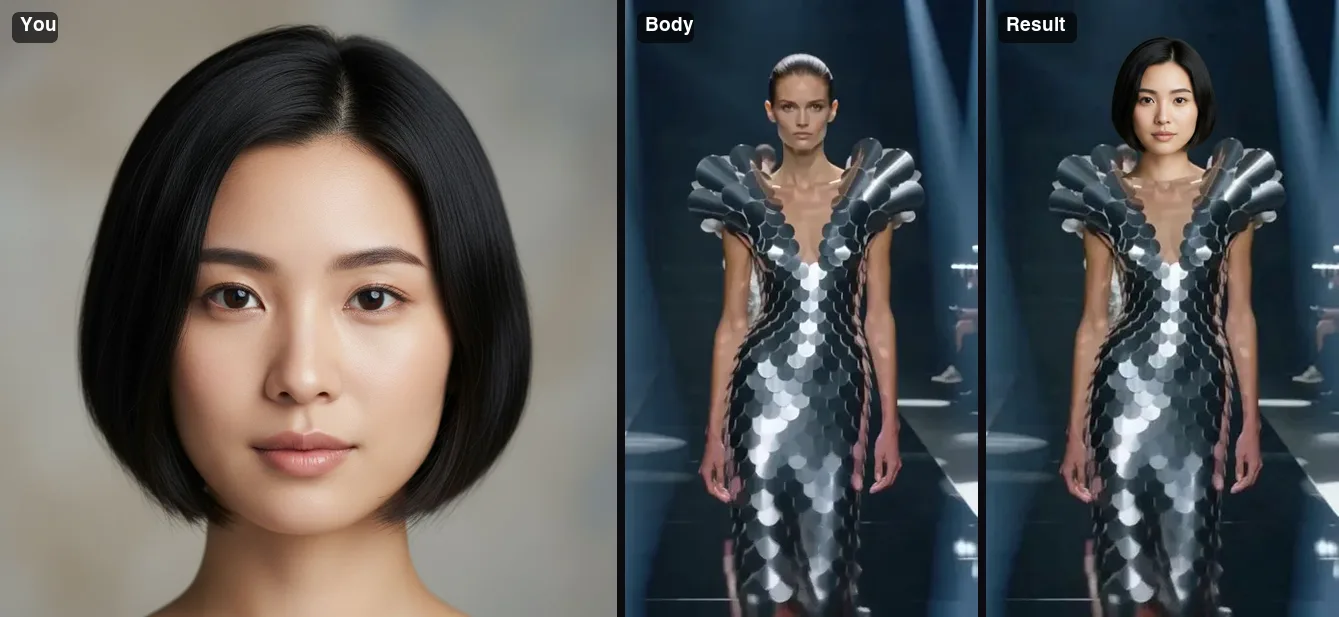 Example · made with RegiAI
 Saved to your workspace history.
AI Body Swap puts you into another photo. Upload a picture of yourself and a picture of a body, and the AI keeps your face, hair, skin tone and identity while taking the full body, body shape, pose, outfit, framing, lighting and background from the second picture. It costs $0.10 per swap, takes about 10 seconds, and qualifies for the one free generation a day.
Think of it as trying on a whole scene rather than a single garment. If you only want to change clothes and keep your own pose, the AI Clothes Changer or AI Outfit Changer is a better fit. If you want to move a head onto a body photo you choose, see AI Head Swap, and for just the face, the AI Face Swap.
A clear photo of you. The face, head, hair and skin tone come from this image. JPG, PNG or WebP up to 10 MB.
A full-body or half-body shot with the pose, outfit and setting you want. Confirm you have permission to use both photos.
Press Swap bodies. The result is ready in about 10 seconds and saved in My creations.
See yourself in a full outfit from a lookbook photo, pose and all, before you shop.
Put yourself into an action shot, a yoga pose or a finish-line photo for motivation or fun.
Place yourself in a photo taken somewhere you want to go, in the pose of the person who was there.
Preview a full costume on your own face before you build or buy it.
Trade bodies with a friend in two photos for a before-and-after joke both of you agreed to.
Combine your face with a posed reference photo for an illustration or a storyboard.
A body swap has two inputs, and each one controls a different part of the result:
This is the opposite way round from AI Head Swap, where you upload the body photo first and the head photo second. The results are similar in spirit, but body swap is tuned for putting a person into a complete new scene, and it requires a consent confirmation. If the two people look quite different in build, remember the body shape comes from the second photo, so choose one you are happy to see yourself in.
Want only a new garment on your current photo? The AI Clothes Changer dresses you in a product photo, and the AI Dress Changer is made for dresses.
To make a brand new photo of two people together, rather than borrowing an existing body, try the AI Couple Photo Generator.
A body swap involves two people: you and whoever is in the body photo. You must confirm you have permission to use both. Never use body swap to sexualize anyone, to create fake compromising images, or to deceive, harass or impersonate. Such use is against our Terms of Service. RegiAI does not add a watermark, so label edited images when you share them.
The body photo matters as much as the face. Pictures of real people in swimwear, underwear, uniforms or private settings are not fair game just because they are online. For outfit and fitness ideas, use stock photos you have a license for, brand lookbook images for personal previews only, or photos of friends who agreed. If a result could embarrass anyone, including you, do not share it. Results stay in My creations for 30 days and can be deleted at any time.
Still stuck? Contact us.
$0.10 per swap, paid from your RegiAI balance. No subscription; you buy credits and pay per use. See pricing.
Yes. Signed-in users get one free generation a day on tools priced $0.10 or less, including this one. It does not stack or roll over.
The first upload, your photo. The body, pose, outfit and background come from the second upload.
Both combine a head from one photo with a body from another. Body swap starts from you and puts you into a new scene; head swap starts from the body photo and gives it a new head. Body swap also asks you to confirm consent.
A clothes changer keeps your own body and pose and changes only the garment. Body swap takes the whole body, pose and scene from the other photo.
There is nothing to install. RegiAI works in the browser on phones and computers after you sign in with Google.
About 10 seconds for most photos.
No. RegiAI does not add a watermark to AI results.
Not with this tool. AI Character Replace replaces a whole person in a video clip with a character from an image.
The charge is refunded to your balance automatically, and a failed free generation is given back.
In My creations for 30 days. You can download or delete them at any time.
You can use results under our Terms of Service and the model provider's license, when you have the rights and consent for both photos.
Yes. Body shape comes from the second photo, along with the pose and outfit. Only the head, face, hair and skin tone come from your photo.
Yes, but a clear head-and-shoulders shot usually gives a better likeness, because the face is larger.
Yes. AI Body Swap is available through the RegiAI API at the same price. See the API docs.