




















Outfit and uniform previews
See your head on a photo of a suit, uniform or costume someone else is wearing.
Put the head from one photo onto the body in another, with the neck, lighting and skin tone blended naturally.
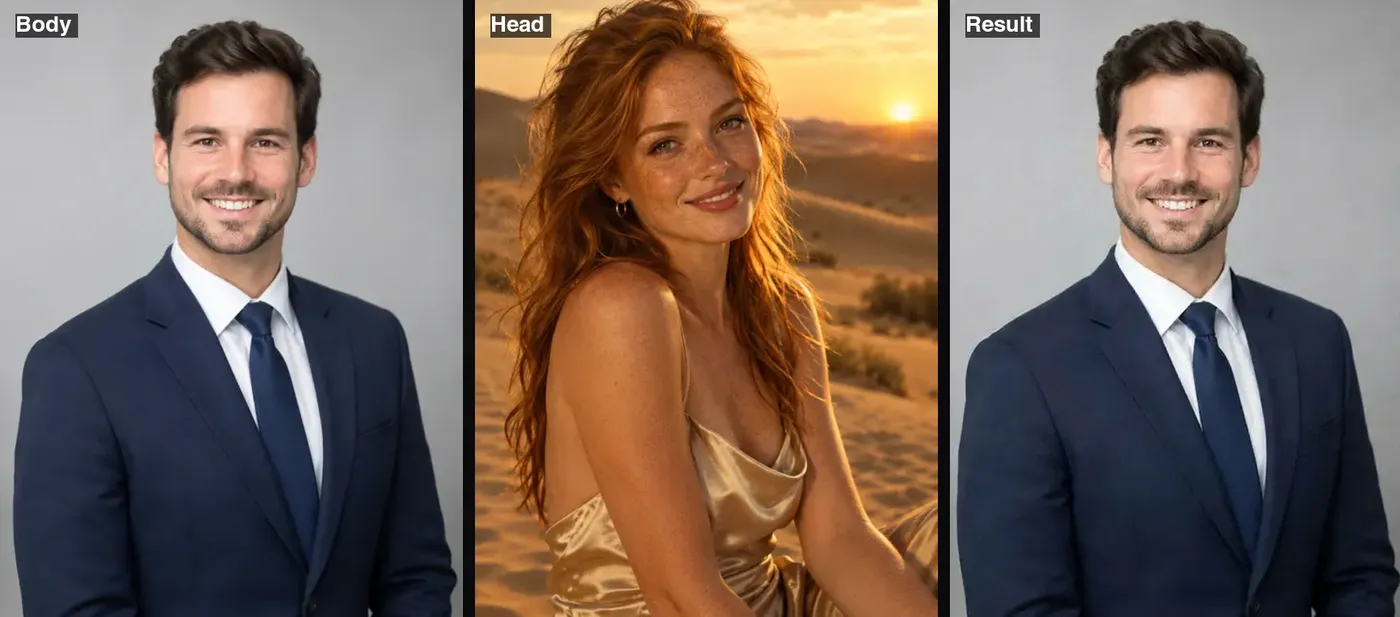 Example · made with RegiAI
 Saved to your workspace history.
AI Head Swap takes the entire head from one photo, including the face, hair and head shape, and places it on the body in a second photo. The body photo keeps its pose, outfit, framing and background, and the AI blends the neck, skin tone and lighting so the join does not show. A swap costs $0.10 and takes about 10 seconds, and signed-in users get one free generation a day.
Head swap is the right choice when hairstyles differ a lot. A regular AI Face Swap keeps the target's hair, so a short-haired face on a long-haired target can look wrong. If you want to keep your own head and borrow a whole outfit and pose, use AI Body Swap instead.
This photo keeps its pose, clothing, framing and background. A clear half-body or full-body shot works best. JPG, PNG or WebP up to 10 MB.
The face and hair from this photo are used. Pick one where the whole head and hairline are visible and not cropped.
Press Swap heads. The blended photo is ready in about 10 seconds and is saved in My creations.
See your head on a photo of a suit, uniform or costume someone else is wearing.
Swap between people with very different hair without ending up with a mismatched hairline.
Put a head onto a posed model shot for a mock magazine cover or event flyer.
Put a friend's head on a bodybuilder, a ballerina or a superhero pose for a birthday card.
Combine a performer's head with a costume reference to plan a character look.
Use a better take of someone's head from another photo taken at the same moment and light.
These three tools sound alike but move different parts of the picture:
For a group photo with several people to change, use Multiple Face Swap. For moving pictures, see AI Face Swap Video and GIF Face Swap.
The hardest part of any head swap is where the head meets the body. You can help the AI a lot with the right photos:
If the result is small or soft, run it through the AI Image Upscaler. To tweak the expression afterwards, use the AI Face Editor.
Only use photos of people who agreed to be edited, and never use a head swap to deceive, harass, impersonate or sexualize anyone, or to make a fake photo look like a real event. RegiAI does not add a watermark, so tell people when an image is edited. Your results stay in My creations for 30 days and can be deleted at any time.
Head swaps are especially easy to misuse because they move a person's whole recognizable head onto a body that is not theirs. Be careful with body photos in swimwear, uniforms or any setting that could embarrass the person, and never put someone's head on a body in a compromising or sexual context. If you are making a gift or a joke, show it to the person first. When in doubt, use your own head, or a head you created with the AI Image Generator.
Still stuck? Contact us.
$0.10 per swap, paid from your RegiAI balance. There is no subscription; you buy credits and pay per use. See pricing.
Yes. Every signed-in user gets one free generation a day on tools priced $0.10 or less, and head swap qualifies. It does not stack or roll over.
Face swap only replaces facial features and keeps the target's hair. Head swap moves the face, hair and head shape together, which looks better when hairstyles are very different.
The first upload, the body photo. The second upload only gives the head, face and hair.
Yes. The AI is instructed to blend the neck and match skin tone and lighting to the body photo. Results are best when both photos have similar light.
Usually about 10 seconds.
No. RegiAI does not add a watermark to AI results.
Not with this tool. For video, AI Face Swap Video swaps the face, and AI Character Replace replaces the whole person.
Only use photos you have the right to use and never to impersonate or deceive. Many public figures' images are protected, so a swap you make for private fun may not be something you can publish.
JPG, PNG and WebP up to 10 MB. Convert iPhone HEIC photos with the free HEIC converter.
The charge is refunded automatically. If it was your free daily generation, you get it back.
You can use results under our Terms of Service and the model provider's license, when you hold the rights and consent for both photos.
Yes. A common use is taking the best head from one shot of a photo session and placing it on a better pose from another shot taken in the same light.
Yes. The body photo keeps its pose, clothing, framing, lighting and background exactly.
Yes. AI Head Swap is available through the RegiAI API at the same price. See the API docs.