




















Family home movies
Bring grandparents' weddings, holidays and first steps back in color.
Colorize black and white video footage with AI. Bring old family films and archive clips to life.
Saved to your workspace history.
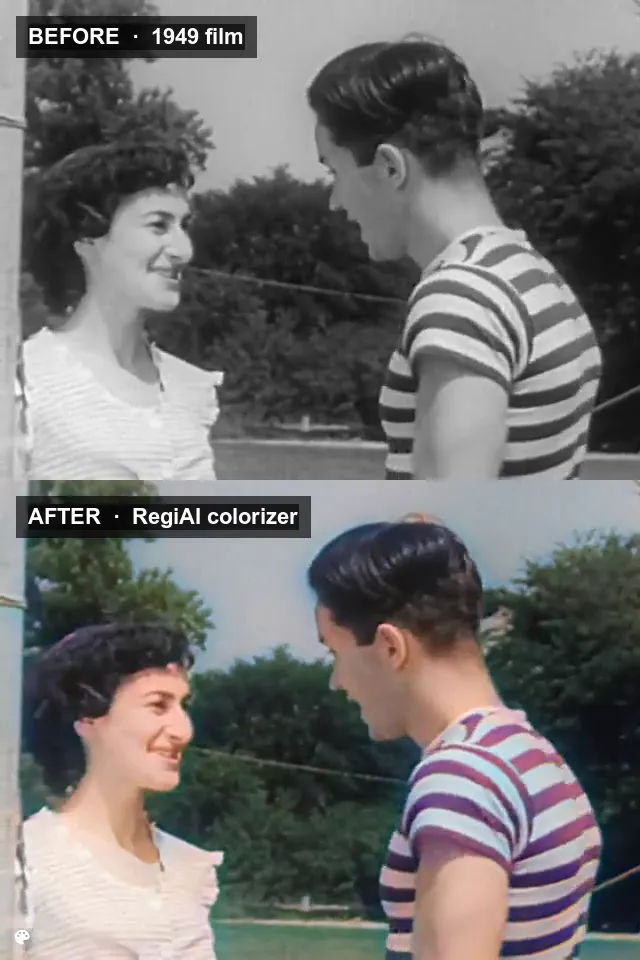
This AI video colorizer lets you colorize black and white video in a few minutes. Upload up to 30 seconds of old family film, archive newsreel or monochrome footage, and the AI adds natural color to every frame: skin tones, sky, grass, clothing and buildings. The picture stays the same; only the color is new.
It costs $0.01 per second of video ($0.05 minimum, $0.30 for 30 seconds), and clips up to 10 seconds can use your one free generation a day. For still photos, use the AI Photo Colorizer, and repair scratches and fading in prints with AI Photo Restoration. After colorizing, the AI Video Upscaler can sharpen a clip to 1080p.
MP4, MOV, AVI or MKV up to 50 MB; longer clips are cut to their first 30 seconds. Digitized film, VHS transfers and archive clips all work.
The AI adds color frame by frame. It usually takes 1 to 5 minutes, and you can leave the page while it runs.
Save it, or find it later in My creations for up to 30 days.
Bring grandparents' weddings, holidays and first steps back in color.
Colorize archive clips for school projects, lessons and history channels.
See short scenes from public domain films in color.
Colorized footage for a memorial video, a birthday tribute or a family reunion.
Before and after clips of old footage are popular on TikTok, Reels and Shorts.
Color monochrome clips you shot yourself for a new look.
Old footage of your town or street, colorized for a museum, society or community page.
Colorize, then upscale to 1080p for a cleaner version of old clips.
A black and white frame only stores brightness. The AI has learned from a large number of color images what things usually look like, so it recognizes faces, sky, foliage, fabric and buildings and predicts fitting colors for each. It works frame by frame across the whole clip.
The result looks like carefully hand-tinted film: natural and slightly muted rather than bright and saturated. That is on purpose. Muted color looks believable on old footage, and it is easy to boost saturation in any video editor if you want a stronger look.
Keep in mind that AI color is a best guess. The model cannot know the real color of a specific dress or car, so treat the result as a plausible reconstruction, not a historical record.
Because color is added frame by frame, it can shift slightly as the camera moves or the light changes, especially on clothing and backgrounds. For most home movies and archive clips this is barely visible, and it is part of the hand-tinted look.
The colorizer keeps the original picture, framing and motion. It does not add frames, change the speed or remove grain, so the colorized clip still feels like the original film, just in color.
Footage with good contrast colorizes best. Very dark or washed-out scans give the AI less information, so if your editor has a simple brightness and contrast control, a small adjustment before uploading can help. Avoid heavy sharpening, which can add halos that get colored too.
Colorizing costs $0.01 per second of video, with a $0.05 minimum, so a full 30 second clip is $0.30. Signed-in users get one free generation a day on runs priced at $0.10 or less, which here means clips of up to 10 seconds. After that, it is pay per use from your balance, with no subscription.
If a colorization fails, the charge is refunded automatically, or your free generation is given back. There is no watermark, and your videos are saved in My creations for 30 days. You can delete them at any time.
A ten-minute family film, colorized in 30 second parts, costs $6. Only upload footage you have the right to use, and if it shows other people, check that they or their families are happy for it to be shared.
Paid runs come from a pay as you go balance. Credit packs start at $10, and larger packs include bonus credit, so a family archive project can be done without any subscription.
Still stuck? Contact us.