




















Family archives
See grandparents and great-grandparents in color, often for the first time.
Turn black and white photos into natural color in seconds. Great for family archives and historic pictures.
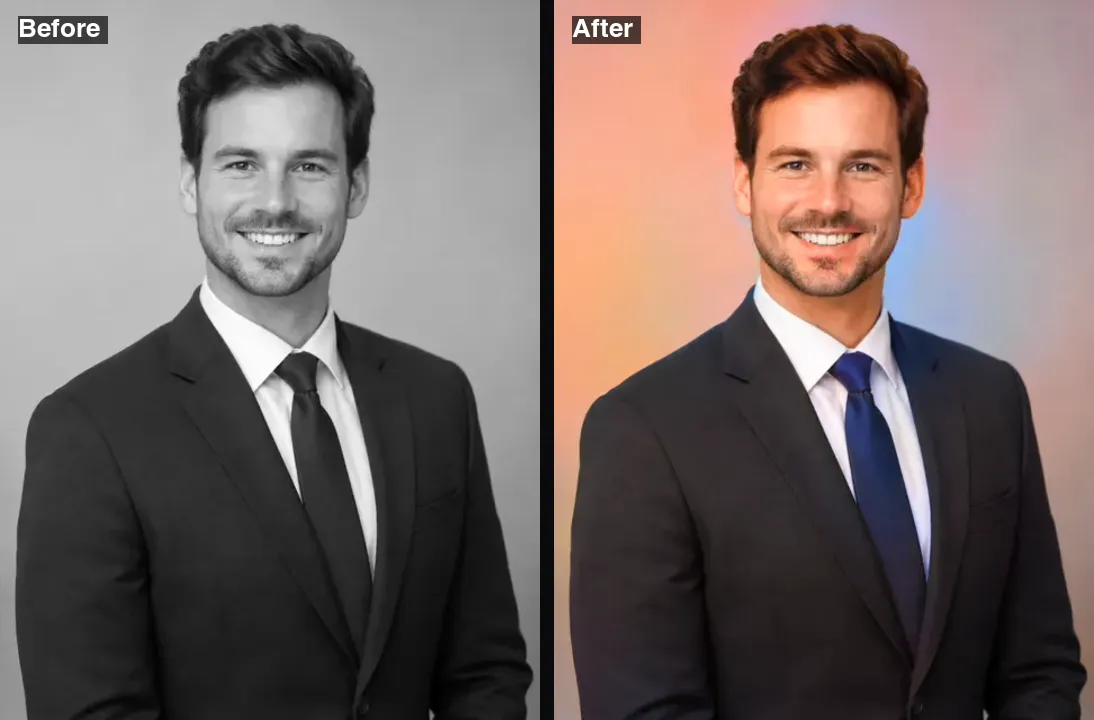 Example · made with RegiAI
 Saved to your workspace history.
The RegiAI AI photo colorizer turns black and white photos into color in a few seconds. Upload a scan of an old family print, a historic picture or a monochrome shot, and the AI adds natural colors to skin, hair, clothing, sky, plants and buildings. You download the result as a full-size PNG.
It costs $0.03 per photo, and your first generation each day is free. The colorizer only adds color: it does not repair tears, scratches or stains. For damaged prints, use AI Photo Restoration, which fixes damage and colorizes in one step. For old videos, there is the AI Video Colorizer.
A JPG, PNG or WebP up to 10 MB. Scans of old prints and phone photos of albums both work.
Click Colorize photo. Skin, sky, clothing and backgrounds get natural colors, usually within seconds.
Save the colorized photo as a PNG. It also stays in your creations for 30 days.
See grandparents and great-grandparents in color, often for the first time.
Bring historic photos to life for a presentation, essay or lesson.
Print a colorized wedding photo or portrait as a gift for a relative.
Make faces, uniforms and places easier to read and compare across old records.
See what a black and white shot of yours would have looked like in color.
Create before and after posts or use colorized stills in a family video.
Share colorized pictures of old streets, shops and landmarks with your town or neighborhood.
Show relatives the colorized version and ask them what the real colors were, then adjust.
The colorizer is fully automatic, so the quality of the input matters most.
Sepia and faded photos work too. The AI treats them as monochrome and chooses new colors.
Photos with a clear subject and good contrast give the most convincing results: portraits, weddings, family groups, street scenes and landscapes. Very dark, very washed-out or heavily grainy scans give the AI less information, so colors may look flatter. If you have several copies of the same photo, use the sharpest and least faded one.
Once colorized, old photos are easy to share. Send them to relatives, print them for a frame, or add them to a family video. You can also animate a colorized portrait with Image to Video for a subtle moving version.
Both tools can give you a color version of an old photo, but they do different jobs and cost different amounts.
Remember that AI colorization is an informed guess. The model knows skies are usually blue and grass is green, but it cannot know the real color of a dress or a car in 1950. If accuracy matters, for example for a museum or a historical record, treat the result as an illustration and label it as colorized. You can adjust a specific color afterwards with the AI Image Editor, for example "make the dress dark red".
Many people use both tools together on the same album: restoration for the damaged prints, the colorizer for the rest. Because the colorizer is a third of the price, it makes sense to try it first on photos that only look faded or gray, and switch to restoration only if the result shows the damage too clearly.
Each photo costs $0.03 from your RegiAI balance, so a $10 credit pack colorizes more than 300 photos. There is no subscription; packs are $10, $25, $50 or $100, with bonus credit on the larger ones. Every signed-in user gets one free generation per day on tools priced $0.10 or less, and this is one of them; it does not stack or roll over. If a colorization fails, the charge is refunded automatically.
Results have no RegiAI watermark and are saved in My creations in your dashboard for 30 days, where you can download or delete them. The first run can take up to a minute if the model is warming up.
For a whole family album, colorize the most important photos first and check the results before doing the rest. If a skin tone or a piece of clothing comes out wrong, fixing that one detail with the AI Image Editor is usually faster than running the whole photo again.
Still stuck? Contact us.