




















Identify products
Find the likely brand, model and type of a gadget, watch, bag or piece of furniture.
Ask anything about a photo — products, plants, outfits or artwork — and give the AI the expertise you need.
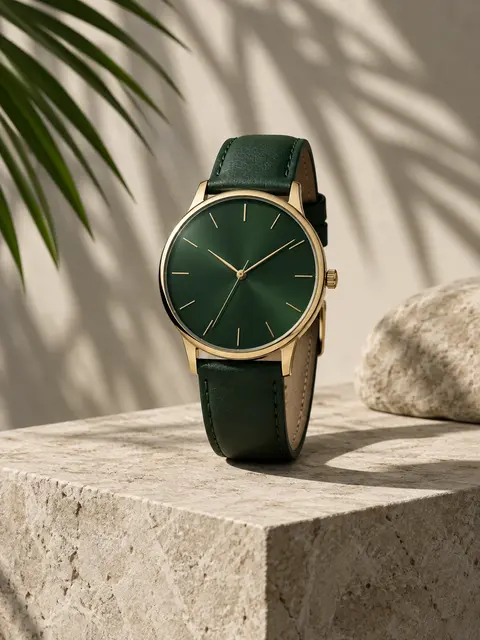 Example · made with RegiAI
Example answer
Q: What product is this? Include brand and model.
A minimalist analog wristwatch with a sunburst forest-green dial, slim gold baton hour markers and hands, a polished gold case and a matching green leather strap. The clean, logo-free design is typical of modern minimalist dress watches.
The RegiAI AI image identifier answers your own question about a photo. Upload a picture and ask, for example, "What product is this? Include brand and model," "What plant is this, and is it safe for cats?" or "What style is this chair?" You can also give the AI a role, such as "You are a botanist," so the answer comes from the right point of view. The image is optional, so it also works for text-only questions.
Each answer costs $0.01, charged only when it succeeds, and your first one each day can be free. For a general description without a question, use the AI Image Describer; to copy text from a picture, use Image to Text.
Upload a JPG, PNG, GIF or WebP up to 10 MB, or skip it to ask a text-only question.
Type what you want to know (up to 2,000 characters). Optionally add a system prompt such as "You are a fashion consultant".
The analysis appears next to your image, usually within seconds. Copy it with one click.
Find the likely brand, model and type of a gadget, watch, bag or piece of furniture.
Name a plant from a photo and ask about care or whether it is safe for pets.
Identify garments and fabrics, and get ideas for similar styles and outfits.
Ask about the style, period, technique or influences of a painting or illustration.
Find out what an unfamiliar tool, part or household object is and what it does.
Ask how many items are in a photo, which colors are used, or what is different between parts.
Get likely matches for a building, landscape or type of place from a travel photo.
Skip the image and ask any question, with a role for the kind of expert you need.
The AI image identifier works best when your question is specific. Compare "What is this?" with "What species of mushroom is this? List the features you used to decide and any look-alikes." The second tells the AI what to look for and what to include.
Example questions: "What breed is this dog, and roughly how old?"; "Is this a real antique or a modern reproduction? What details suggest either?"; "Name every item of clothing and suggest where to find similar pieces"; "What is this error on my car dashboard?".
This is an image identification tool: it looks at what is in a photo and answers questions about it. It is not an AI detector. It does not tell you whether an image or a text was made by AI, and it should not be used for that.
It is also not a face-recognition tool. Do not use it to find out who a person is. Ask about objects, places, plants, animals, clothing and art instead.
Treat identifications as a well-informed opinion, not a certified result. For anything where a mistake matters, such as whether a plant or mushroom is safe to eat, whether a collectible is authentic, or a medical question about a rash or an injury, confirm with a qualified expert. The AI can be confident and still wrong.
If the answer seems off, look at the photo from the AI's point of view: is the key detail visible, in focus and large enough? A closer, better-lit photo usually fixes it.
Every question costs $0.01, with or without an image, and you are only charged when an answer comes back. Your first question each day can be free with the daily free generation. There is no subscription; credit packs start at $10, which covers hundreds of questions.
Choose the right tool for the job: the AI Image Describer writes a general description for alt text and captions, What Is Depicted in the Image Above helps students with picture questions, AI Picture Answer solves math and science problems, and Image to Text copies printed words. If your photo is too dark or small to identify, improve it first with the AI Image Upscaler.
Every answer is shown next to your image with a copy button, so you can paste it into a note, a shopping search or a message.
If you are not sure which tool to use, start here: the identifier can describe, explain and answer, while the other tools are tuned for one specific job.
Still stuck? Contact us.