




















Portrait to YouTube thumbnail
Turn a vertical phone photo into a 16:9 frame with room for a title.
Extend any photo beyond its borders. Turn a portrait into a wide banner or a square into a vertical story, with AI filling in the scene.
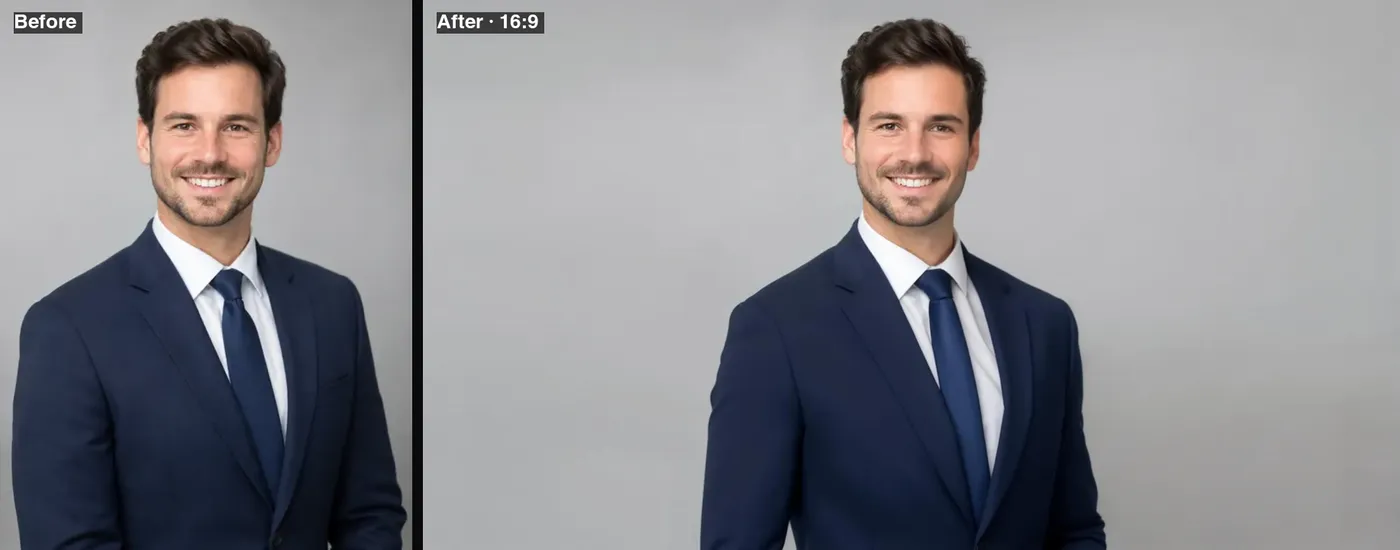 Example · made with RegiAI
 Saved to your workspace history.
The RegiAI AI image expander extends a photo beyond its original borders. Choose a new shape, such as 16:9 for a banner or 9:16 for a story, and the AI paints in the missing sky, floor, walls or scenery so the picture fits without cropping anyone out. This is also called outpainting, uncropping or AI image extending.
It costs $0.03 per image and your first generation each day is free. If you only need to change the pixel size, the free Resize Image and Crop Image tools are enough. If you want to change what is inside the photo rather than around it, use the AI Image Editor.
Any JPG, PNG or WebP up to 10 MB that you want to widen or lengthen.
Pick 16:9, 9:16, 1:1, 4:3 or 21:9. Optionally describe the surroundings, like "a sunny park with trees".
In about 15 seconds you get the expanded image, about 2,048 pixels on the long edge.
Turn a vertical phone photo into a 16:9 frame with room for a title.
Extend a square post to 9:16 so it fills the phone screen without black bars.
Make a wide 21:9 hero image from a normal photo, with space for text.
Give a subject more breathing room when the original was framed too close.
Stretch a photo to 16:9 so it fills a slide edge to edge.
Bring photos of different shapes to one aspect ratio for a gallery or listing.
Add empty space beside a subject for an ad headline, a quote or a call to action.
Extend artwork so it wraps a book cover or fits a print format without cutting the subject.
When you pick a wider or taller shape than your photo, there is empty space on one or more sides. The AI looks at the edges of your image, including the light, colors, textures and perspective, and generates new content that continues the scene naturally. Your photo stays in the frame and the AI builds the new areas around it.
The optional description helps when the AI cannot guess what should be there. Examples:
Leave it empty for most photos; the AI usually continues the scene well on its own.
Which shape to pick: 16:9 for YouTube thumbnails, presentations and desktop wallpapers; 9:16 for Instagram and TikTok stories, reels and phone wallpapers; 1:1 for feed posts and profile pictures; 4:3 for classic photo prints and some tablets; and 21:9 for wide website headers and cinematic banners. The expander always outputs the exact ratio you choose, at about 2,048 pixels on the long edge, so the file is ready to upload without further cropping.
Need a video in the new shape rather than a still? The AI Video Extender works on clips, and Image to Video can animate your expanded photo.
If the new area does not look right, run it again. Each generation is a fresh attempt, and a short description of the surroundings often fixes a result that guessed wrong, for example a beach where you wanted a forest.
Remember that the new areas are generated, not recovered. That is perfect for backgrounds, but do not use an expanded image as evidence of what was really beside the original frame.
Each expansion costs $0.03 from your RegiAI balance. There is no subscription: you pay per use with credit packs of $10, $25, $50 or $100, and larger packs add bonus credit. Every signed-in user gets one free generation per day on tools priced $0.10 or less, including this one. It does not stack or roll over. Failed expansions are refunded automatically.
The result has no RegiAI watermark and is saved in My creations in your dashboard for 30 days, where you can download or delete it.
Compared with the alternatives, expanding is often the cheapest fix for a photo in the wrong shape. Cropping throws part of the picture away, and stretching distorts it. At $0.03, you keep the whole subject and gain a background that fits.
Expanded images work well with the rest of RegiAI. Generate an image with the AI Image Generator in one shape and expand it to another for a different platform, or expand a product photo and then change the new background with the AI Image Editor. For pure format changes after expanding, the free Image Converter turns the JPG into PNG, WebP or AVIF.
Still stuck? Contact us.