




















Profile pictures
A stylized avatar for Discord, X, Instagram or a gaming profile that still looks like you.
Turn a selfie into anime, cartoon, clay, pixel art, Lego and more, or become an astronaut, samurai or wizard.
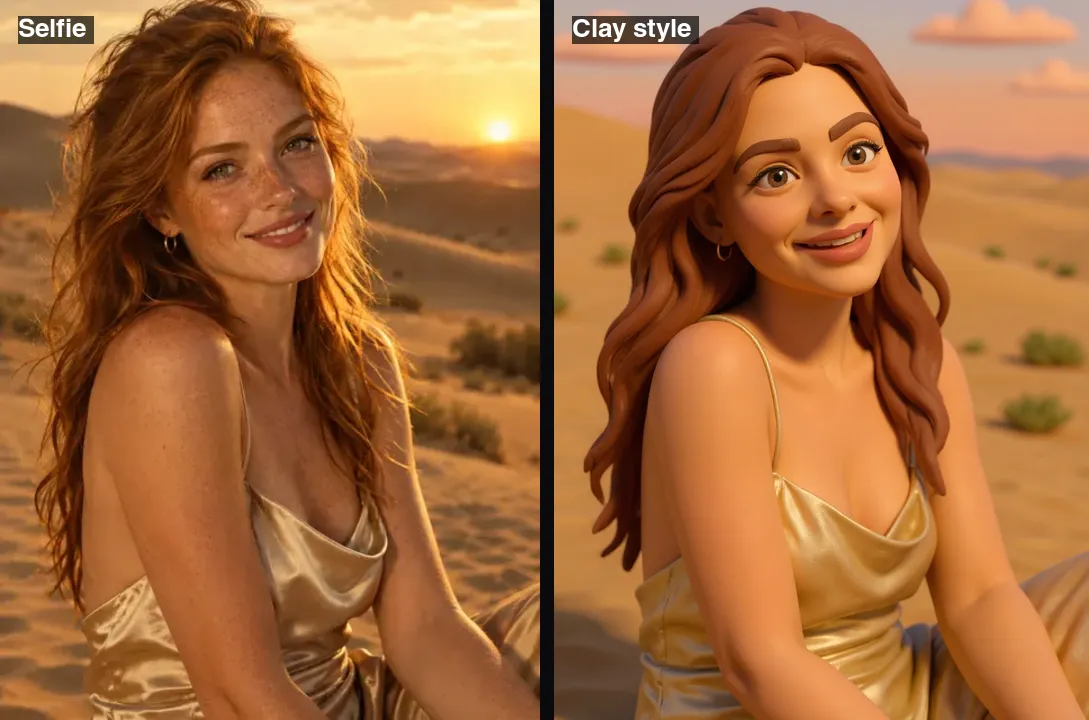 Example · made with RegiAI
 Saved to your workspace history.
The AI Selfie Generator turns a single selfie into a stylized picture of you. Choose one of ten styles, from anime and cartoon to clay, pixel art, Lego, Memoji and Minecraft, and if you like, add a character such as an astronaut, samurai, ninja, wizard, robot, angel or vampire. The model keeps your facial features, so the result still reads as you. Each image costs $0.10, takes about 10 seconds, and signed-in users get one free generation a day.
It is a quick way to make a profile picture or avatar. For a realistic business photo instead, use the AI Headshot Generator. To turn any photo, not just a selfie, into anime, try the AI Anime Filter, and for a boxed toy version of yourself see the AI Action Figure Generator.
A clear, well-lit photo of your face, as a JPG, PNG or WebP up to 10 MB. The output keeps the shape of your photo.
Choose a style such as Anime, Clay or Pixel art, and optionally a character like Astronaut or Samurai. Leave it on "Just me" to stay yourself.
Press Create selfie. The image is ready in about 10 seconds and saved in My creations.
A stylized avatar for Discord, X, Instagram or a gaming profile that still looks like you.
See yourself as an anime hero or a Saturday-morning cartoon.
Become a samurai, ninja, wizard or angel for a tabletop game or a story.
Make a retro pixel avatar or a blocky Minecraft-style portrait for your stream.
Turn yourself into a clay figure or a toy brick minifigure for a fun post.
Give everyone on a team or class the same style for a consistent set of avatars.
You combine one style with an optional character. That makes dozens of combinations from one selfie.
Some pairings that work well: Anime + Samurai for a bold avatar, Clay + Astronaut for something playful, Graphic novel + Vampire for a moody poster, and Minimalist + Just me for a clean, simple profile picture. Each run is a new generation, so try a second time if the first one is not quite right.
Want the same person in a real-world scene instead? The AI Couple Photo Generator places two people together in a photo, and the AI Face Editor changes your expression while keeping the photo realistic.
The output keeps the aspect ratio of your photo, so crop your selfie square first if you need a square avatar. Most profile pictures are shown in a circle, so leave a little space around your head when you crop.
Once you have a result you like, a few free and paid tools help you get more out of it:
The selfie generator works best with your own face, and that is also the simplest way to stay on the right side of consent. If you make avatars of friends or colleagues, ask them first and let them pick their favorite. Results are kept in My creations for 30 days and can be deleted at any time.
Still stuck? Contact us.
$0.10 per image, paid from your RegiAI balance. No subscription; see pricing.
Yes, one image a day. Signed-in users get one free generation a day on tools priced $0.10 or less, including this one. It does not stack or roll over.
The model keeps your facial features while changing the art style. A clear, front-facing selfie gives the strongest likeness.
Anime, Cartoon, Clay, Graphic novel, Pixel art, Lego, Memoji, Minecraft, Minimalist and Gothic, plus optional characters like Astronaut, Samurai, Ninja, Wizard, Robot, Angel and Vampire.
The output matches the shape of your upload, so crop your selfie square first with the crop tool.
The AI Anime Filter converts any photo to anime. The selfie generator is focused on faces and offers ten styles and character options.
It is designed for one face. Crop the person you want before uploading.
About 10 seconds.
No. RegiAI does not add a watermark to AI results.
No download needed. It runs in the browser on phones and computers after you sign in with Google.
The charge is refunded automatically, and a failed free generation is given back.
In My creations for 30 days. You can delete them at any time.
You can use results under our Terms of Service and the model provider's license. Only upload selfies of yourself or people who agreed.
The styles are tuned for human faces. Pets may work in some styles, but results are less predictable.
Yes. Remove the background with the free background remover to get a transparent PNG.
Yes. The selfie generator is available through the RegiAI API at the same price. See the API docs.