




















Long-distance couples
Get a photo together in the same place when you live in different cities or countries.
Upload two photos and get a natural photo of you together, anywhere you like.
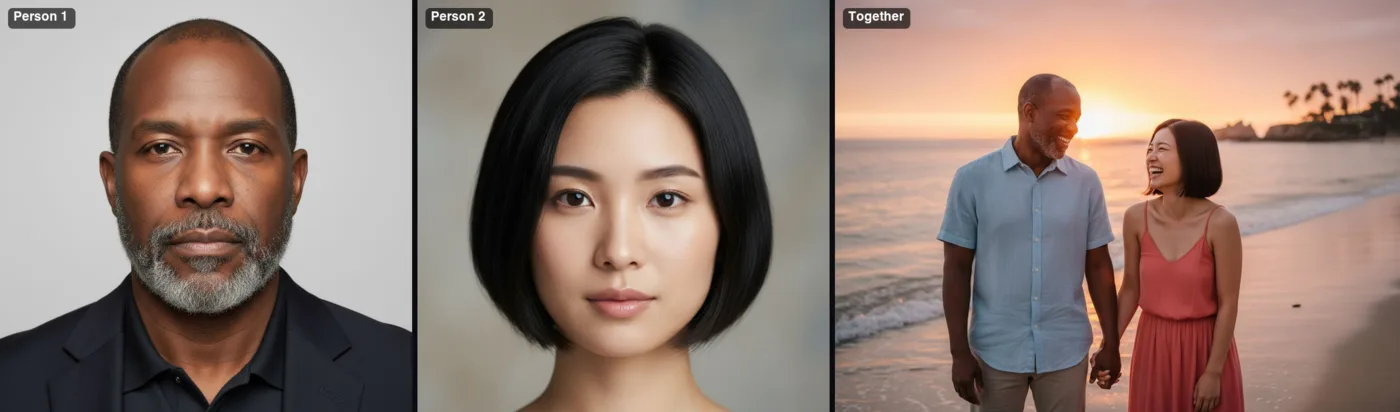 Example · made with RegiAI
 Saved to your workspace history.
The AI Couple Photo Generator makes a new photo of two people together from two separate pictures. Upload one photo of each person, pick a scene such as a sunset beach, a Paris street or a snowy mountain, and get a natural-looking 4:3 photo of the two of you side by side. Faces, hair and skin tones are kept from your photos. Each picture costs $0.10, and signed-in users get one free generation a day.
It is handy for long-distance couples, friends who never got a picture together, or a quick card for an anniversary. If you already have a photo together and want to change it, the face tools may be a better fit: Multiple Face Swap for group photos, or AI Body Swap to put yourself into an existing scene.
One clear photo of each person, JPG, PNG or WebP up to 10 MB. Head-and-shoulders or half-body shots with visible faces work best.
Choose from eight scenes and, if you like, add up to 200 characters such as "holding hands, laughing". Confirm you have permission to use both faces.
Press Create couple photo. The picture is ready in about 10 seconds and saved in My creations.
Get a photo together in the same place when you live in different cities or countries.
Make a personal card with the two of you on a beach at sunset or in Paris.
Create a cozy holiday picture by the tree when you could not be together.
Make the photo together you never took, for a birthday post or a framed gift.
Get a clean studio-style photo of two people for a profile or announcement.
Preview a wedding-day look as a couple for fun or to share with family.
The generator has eight ready-made scenes, each written to give natural light and a believable setting:
The extra details box lets you steer poses and mood: "hugging", "walking hand in hand", "both wearing sweaters", "laughing at the camera". Keep it short and concrete; long lists of details are harder to follow. For a fully custom scene, write your own prompt in the Nano Banana editor or AI Image Editor.
For a solo picture in a new style, try the AI Selfie Generator. For a clean business photo of one person, use the AI Headshot Generator.
A couple photo shows two people together in a place they may never have been. Only use photos of people who agreed, and never use this tool to fake a relationship, deceive a partner or family member, or harass anyone. You must tick the consent box before generating. Results are saved in My creations for 30 days and can be deleted at any time.
It is fine to make a sweet surprise for a partner, but show it to them before you share it with others. Do not create couple photos with an ex, a crush, a celebrity or anyone who has not agreed, and do not use them as fake proof of a relationship or trip. RegiAI does not add a watermark, so if people might take the photo as real, say it was made with AI.
Still stuck? Contact us.
$0.10 per photo, paid from your RegiAI balance. There is no subscription. See pricing.
Yes, once a day. Signed-in users get one free generation a day on tools priced $0.10 or less, including this one. It does not stack or roll over.
No. They can be taken at different times and places. Clear faces and similar quality give the most natural result.
You pick one of eight scenes and can add details. For a completely custom setting, describe it in the AI Image Editor.
The photo comes out in a 4:3 landscape format as a JPG.
Yes. Any two people who agreed can be combined, for example best friends or a parent and child.
This tool takes two people. For existing group photos, Multiple Face Swap handles up to four faces.
About 10 seconds.
No. RegiAI does not add a watermark to AI results.
It is refunded to your balance automatically, and a failed free generation is given back.
Yes. It runs in the browser on any phone or computer after you sign in with Google.
You can use results under our Terms of Service and the model provider's license, when both people have agreed.
Yes. For large prints, upscale the result first with the AI Image Upscaler.
The AI is told to keep both faces, hair, skin tones and identities from your photos. Sharp, well-lit photos with visible faces give the best likeness.
Yes. The couple photo generator is available through the RegiAI API at the same price. See the API docs.