




















Add a smile
Turn a stiff or neutral face into a warm, natural smile for a profile or a family photo.
Change facial expressions in a photo: add a smile, a laugh, a wink or a surprised look, while keeping the person recognizable.
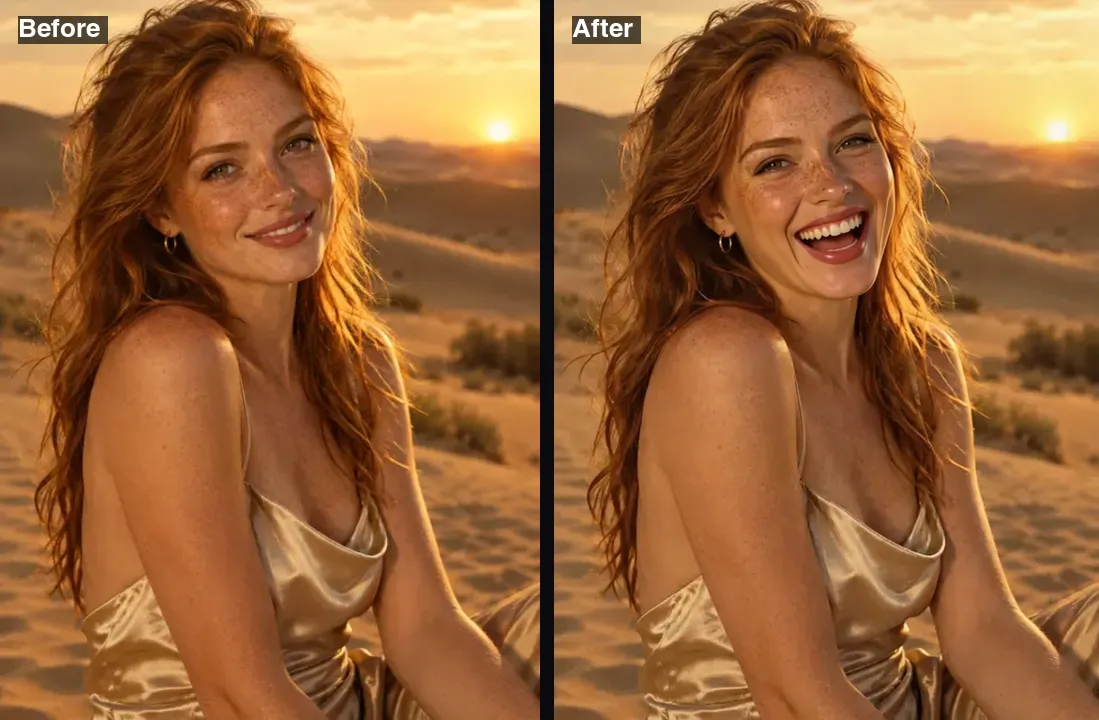 Example · made with RegiAI
 Saved to your workspace history.
RegiAI's AI face editor changes the expression on a face in a photo. Pick from nine options, including a natural smile, a big laugh, a wink, a surprised look or eyes turned to one side, and the AI edits only the expression while keeping identity, face shape, hair, clothing, background, framing and lighting the same. Each edit costs $0.03, is usually done in about 5 seconds, and signed-in users get one free generation a day.
It fixes the classic problem of a good photo with the wrong face: a serious look in a birthday picture, or a gaze pointing the wrong way in a design. To swap in a different face entirely, use AI Face Swap. For open-ended edits described in your own words, try the AI Image Editor.
A clear photo where the face is visible and not too small. JPG, PNG or WebP up to 10 MB.
Natural smile, big laugh, surprised, wink, serious, sad, angry, look left or look right.
The edited photo is ready in about 5 seconds and saved in My creations. Try another expression on the same photo if you like.
Turn a stiff or neutral face into a warm, natural smile for a profile or a family photo.
Soften a serious work photo so it feels more approachable.
Make a surprised, angry or laughing version of a photo for a meme or a sticker.
Turn the eyes and head slightly left or right to point at text or a product in a design.
Give a video thumbnail a bigger, clearer expression that matches the video.
Make a set of expressions from one portrait for a comic, game or storyboard.
Each run edits the original photo you upload. To stack changes, for example a smile and then a head turn, download the first result and upload it again.
The editor is instructed to keep everything but the expression the same: identity, face shape, hair, clothing, background, framing and lighting. That makes it different from the other face tools on RegiAI:
For best results, use a face that is large in the frame and lit from the front. If the face is small, crop closer with the crop tool first. Big changes, such as a laugh on a face with a closed mouth, ask the AI to invent teeth and creases, so check the result at full size. Only edit photos of people who agreed, and never use an edited expression to misrepresent what someone felt or said.
Changing an expression is a small edit, but it changes what a photo says about a person. A few guidelines keep it useful and fair:
If the result is close but slightly soft, the AI Image Upscaler can sharpen it. For a full professional portrait from a casual photo, use the AI Headshot Generator and then fine-tune the expression here. Results are kept in My creations for 30 days and can be deleted at any time.
Still stuck? Contact us.
$0.03 per edit, paid from your RegiAI balance. No subscription; see pricing.
Yes, once a day. Signed-in users get one free generation a day on tools priced $0.10 or less, and this tool qualifies. It does not stack or roll over.
The editor is told to keep identity, face shape, hair, clothing and background unchanged and only adjust the expression. Clear, front-lit faces give the most faithful results.
Natural smile, big laugh, surprised, wink, serious, sad, angry, look to the left and look to the right.
Yes. That is the default option. Upload the photo and keep "Natural smile" selected.
It is built for one face. Crop the person first so their face fills more of the image.
Not in this tool. Describe the change in the AI Image Editor, or try the Bald Filter and No Beard Filter.
About 5 seconds.
No. RegiAI does not add a watermark to AI results.
No install needed. It runs in the browser on phones and computers after you sign in with Google.
The charge is refunded automatically, and a failed free generation is given back.
In My creations for 30 days. You can delete them at any time.
You can use results under our Terms of Service and the model provider's license, when you have rights to the photo and consent from the person in it.
The face editor has no option for that. Try describing the change in the AI Image Editor.
Yes. The face editor is available through the RegiAI API at the same price. See the API docs.