




















Preview before treatment
Get a feel for the look before your orthodontist appointment.
Add realistic braces to a smiling photo, in metal, clear or any color you like.
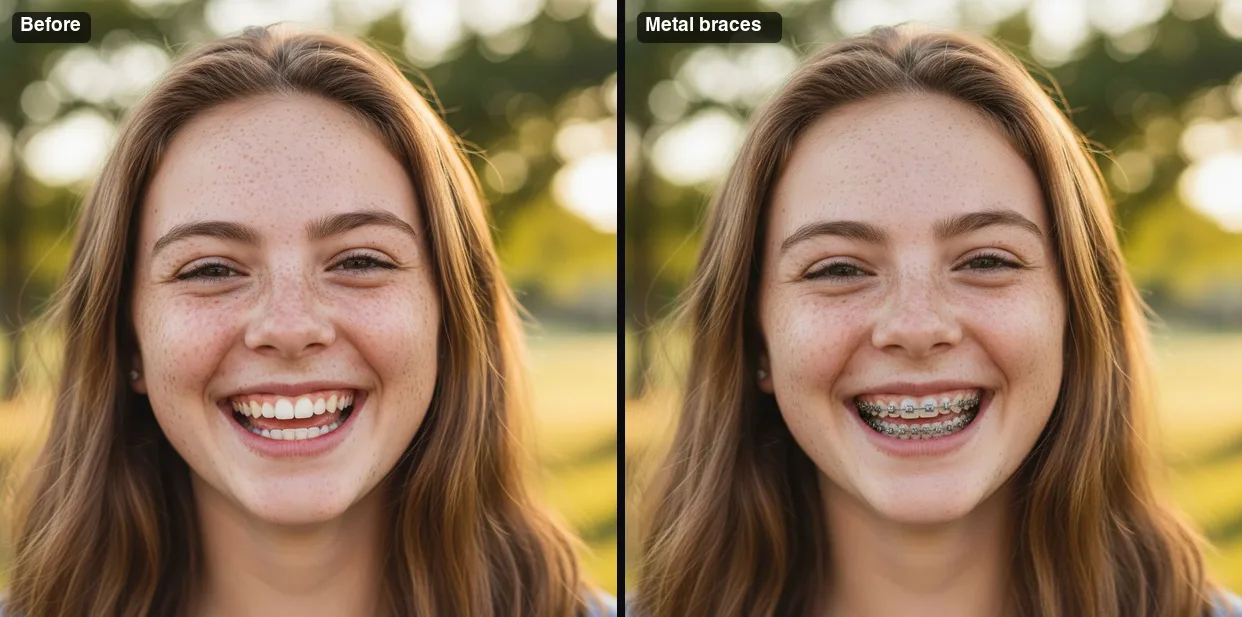 Example · made with RegiAI
 Saved to your workspace history.
The RegiAI braces filter shows you how you would look with braces. Upload a photo where you are smiling and your teeth are visible, pick classic metal, clear ceramic or colored bands, and the AI adds realistic brackets and wire to your teeth. Everything else stays the same: your face, smile, teeth shape, lips and lighting. It takes about 10 seconds, costs $0.10, and signed-in users get one free try a day.
It is a quick way to answer "how do I look with braces?" before an orthodontist visit, or to pick a band color. For other looks, try the Bald Filter, the No Beard Filter or the AI Face Editor, which can turn a closed-mouth photo into a smile first.
A clear, front-facing photo where your teeth are visible. JPG, PNG or WebP up to 10 MB.
Metal, Clear or Colored. For colored braces, pick blue, pink, purple, red, green, black or rainbow bands.
Press Add braces. The photo is ready in about 10 seconds. Try other colors on the same photo to compare.
Get a feel for the look before your orthodontist appointment.
Compare blue, pink, purple, red, green, black and rainbow bands on your own smile.
See how visible classic metal braces are compared to clear ceramic ones.
Show a nervous teenager that braces can look good before they start.
Add braces to a character photo for a school play, costume or story.
Share a "new braces" photo with friends who are in on the joke.
Because each run starts from your original photo, you can try all three and put them side by side. Colored bands are usually changed at each orthodontist visit, so it is a fun way to plan the next color too.
The braces filter only changes your teeth. To change your expression, use the AI Face Editor. To see yourself in a different style altogether, try the AI Selfie Generator or the AI Anime Filter.
The AI can only add braces to teeth it can see. These tips make the biggest difference:
This is a cosmetic preview, not a dental assessment. It does not show how your teeth will move or what treatment you need; your orthodontist can tell you that.
Many people search for a braces filter when braces are about to become real: a teenager with an upcoming appointment, an adult weighing clear braces against metal, or a parent helping a nervous kid. A realistic preview can take some of the worry out of it.
It is also popular just for fun, for a costume, a throwback photo or a character in a school project. Whatever the reason, only use photos of people who agreed, and do not use the filter to tease or bully anyone. Your photos are kept in My creations for 30 days and can be deleted at any time.
Still stuck? Contact us.
$0.10 per photo, paid from your RegiAI balance. There is no subscription; see pricing.
You can try it free once a day. Signed-in users get one free generation a day on tools priced $0.10 or less, including this one. It does not stack or roll over.
Upload a clear smiling photo with your teeth visible, choose metal, clear or colored braces, and press Add braces.
Blue, pink, purple, red, green, black and rainbow bands on metal braces, plus plain metal and clear ceramic.
No, the teeth need to be visible. You can first open the smile with the AI Face Editor and then add braces.
It is online. It runs in your browser on phone or computer after you sign in with Google; there is nothing to install.
The AI is told to keep your face, smile, teeth shape, lips and lighting the same and only add braces.
No. It is a cosmetic preview, not a dental or medical tool. Ask your orthodontist about treatment.
About 10 seconds.
No. RegiAI does not add a watermark to AI results.
The charge is refunded automatically, and a failed free generation is given back.
In My creations for 30 days. You can delete them at any time.
Only with their permission, and never to mock or harass anyone.
You can try clear ceramic braces. Clear aligners are not an option in this filter.
Yes. The braces filter is available through the RegiAI API at the same price. See the API docs.