




















Swap the background
Put a product on a marble table or a portrait in front of a city skyline.
Describe the change and RegiAI edits your photo: swap backgrounds, add or remove objects, change colors, relight a scene.
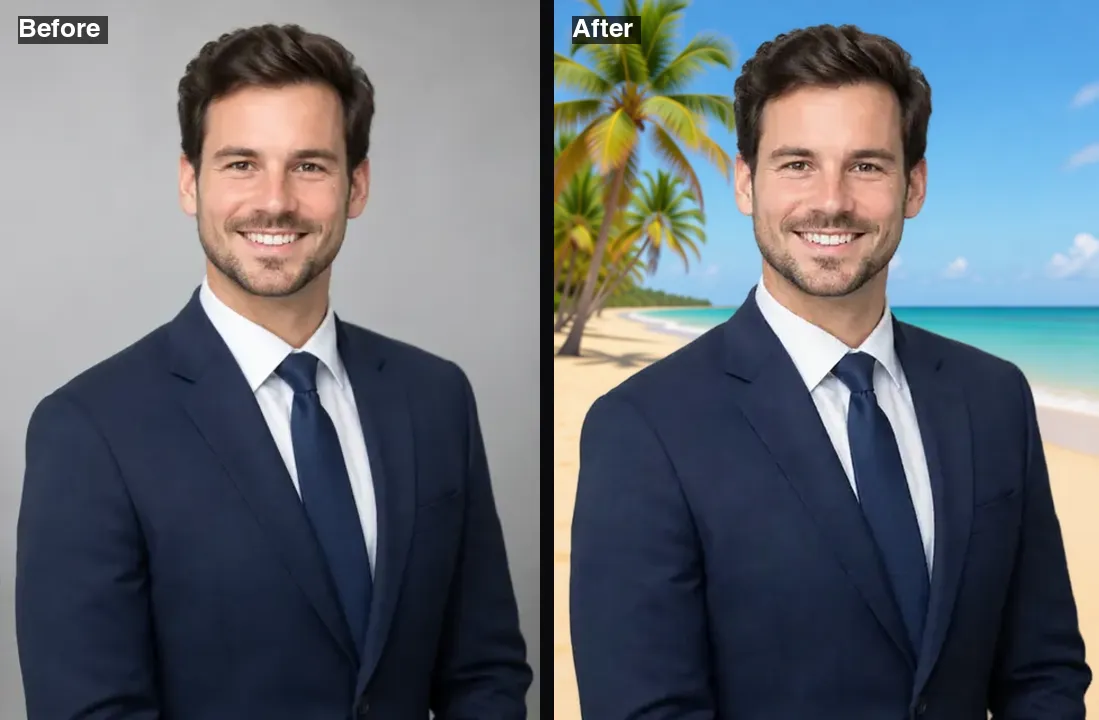 Example · made with RegiAI
 Saved to your workspace history.
The RegiAI AI image editor changes a photo from a sentence. Upload an image, write what should change, such as "replace the background with a sunny beach" or "make his jacket navy blue", and get the edited photo in about five seconds. There are no layers, brushes or masks to learn, and the rest of the photo stays as it was.
At $0.03 per edit it is the cheapest way to make quick changes, and the first edit each day is free. For heavier edits that must keep a person very consistent, try Nano Banana AI. For focused jobs there are dedicated tools: the AI Outfit Changer for clothes, the AI Face Editor for expressions and the Background Remover for cut-outs.
JPG, PNG or WebP up to 10 MB. Any subject works: people, products, rooms, landscapes.
Say what to change in plain words, up to 1,000 characters, for example "remove the people in the background".
The edited image keeps the shape of your original and is ready in about five seconds.
Put a product on a marble table or a portrait in front of a city skyline.
Take out tourists, cables, bins or clutter that spoil a shot.
Recolor a car, a wall, a dress or a logo to see another option.
Turn a gray day sunny, add snow, or make a daytime scene look like night.
Swap a jacket, a shirt color or an accessory with a short instruction.
Make it look like a rainy night in Tokyo, a vintage postcard or a painting.
Show a room with different wall colors, new furniture or a tidier look.
Adapt one product photo into seasonal versions for posts and ads.
The editor reads your instruction and changes only what you describe, keeping the composition, framing and aspect ratio of your photo. Common edits:
For some jobs a specialised tool gives a better result. To widen a photo beyond its borders, use the AI Image Expander. To remove a watermark, use the AI Watermark Remover. To try on a specific garment from a product photo, use the AI Clothes Changer.
Things the editor is not built for: precise pixel work such as retouching skin blemishes one by one, adding exact brand logos, or writing long passages of text into an image. For text-heavy designs, generate a new image with Ideogram or Recraft in the AI Image Generator instead.
Only edit photos of people with their permission, and do not use edits to mislead others about real events.
Example instructions that work well: "replace the gray sky with a clear blue sky", "remove the car parked on the left", "make the walls light sage green", "add warm string lights along the fence", "turn this summer photo into a snowy winter scene". Each one names a single thing and says clearly what should happen to it.
Each edit costs $0.03 from your RegiAI balance. There is no subscription: buy a credit pack of $10, $25, $50 or $100 (larger packs include bonus credit) and pay per use. A $10 pack covers more than 300 edits. Every signed-in user also gets one free generation per day on tools priced $0.10 or less, which includes this editor; it does not stack or roll over. Failed edits are refunded automatically.
Edited images have no RegiAI watermark and are saved in My creations in your dashboard for 30 days, where you can download or delete them.
Because each edit is cheap, a good habit is to try two or three phrasings of the same instruction and keep the best. The editor works on the whole image at once, so there is no need to select an area first; just name the object and where it is.
Compared with a traditional editor, the trade-off is control versus speed. A manual editor lets you place every pixel but takes skill and time. The AI image editor gives you a finished result in seconds from a sentence, which is ideal for social posts, listings, mockups and quick fixes. For a final print or a client job, you can still open the AI result in your usual editor for fine touches.
Still stuck? Contact us.