




















Check a buy before you order
Screenshot a product photo from any store and see it on yourself before you spend money or deal with a return.
Try on any outfit virtually. Upload a photo of a person and a photo of a garment, and see it worn in seconds.
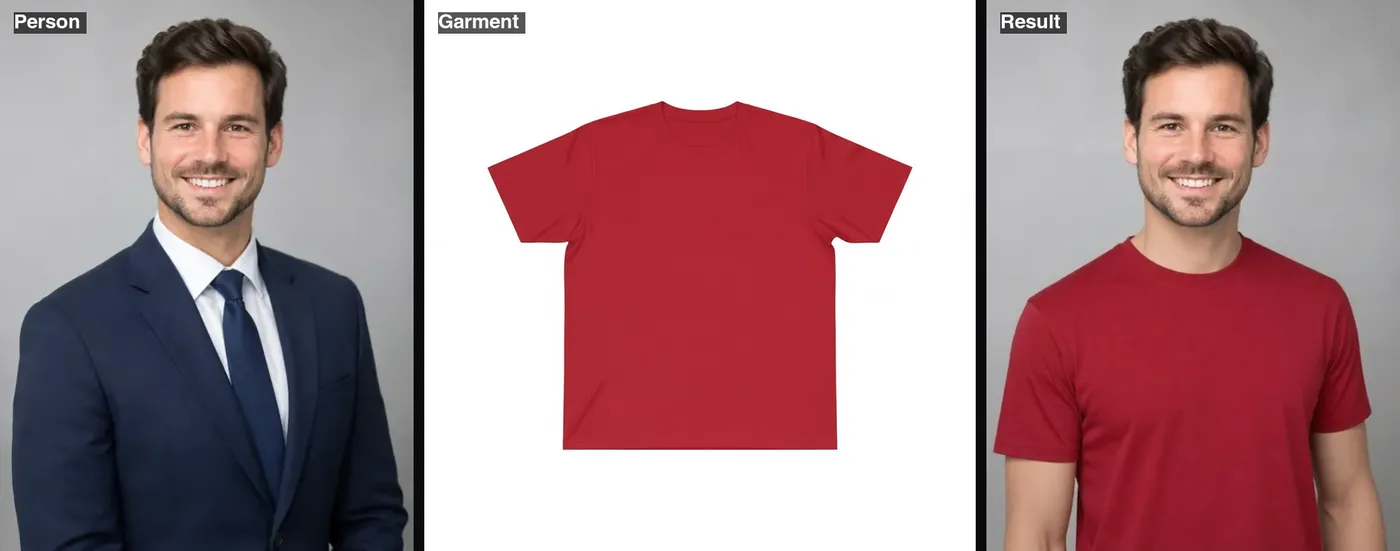 Example · made with RegiAI
 Saved to your workspace history.
The RegiAI AI clothes changer is a virtual try-on tool: you upload a photo of a person and a photo of a real garment, and it dresses the person in that exact piece. It keeps the face, pose and background and only replaces the clothing, so you can check how a shirt, jacket or dress from an online shop would look before you buy it.
This is the tool to use when you already have a picture of the item. If you would rather describe an outfit in words, use the AI Outfit Changer. If you want to pick from ready-made dress styles like a wedding gown or saree, use the AI Dress Changer. Each try-on costs $0.05, and your first generation each day is free.
Use a clear, front-facing photo that shows the full upper body. Good light and arms away from the torso give the cleanest result.
Add a product photo of the shirt, dress, jacket or trousers, ideally laid flat or on a plain background with the whole item in view.
Click Try it on. In about five seconds you get the person wearing the garment, ready to download as a JPG.
Screenshot a product photo from any store and see it on yourself before you spend money or deal with a return.
Show a garment on a model photo without booking a shoot for every color or new item.
Try several jackets or dresses on the same photo and compare them side by side.
Upload the same shirt in different colors and pick the one that suits your skin tone.
Swap a casual top for a blazer on a photo you already like, without a new photoshoot.
Make try-on posts, lookbooks and styling ideas for social media from flat-lay garment photos.
Send a try-on to friends or family and ask which one to buy, instead of a blurry changing-room selfie.
Try new pieces on the same photo to see which ones work together before you commit.
RegiAI has three tools that change what someone is wearing. They look similar but take different inputs, so picking the right one saves time and credit.
If you want to keep your face but take someone else's whole body, pose and outfit, that is a different job for the AI Body Swap.
The try-on model works from what it can see, so the input photos matter more than anything else.
Uploads can be JPG, PNG or WebP up to 10 MB each. The result keeps the size of your original person photo. If it needs cleaning up afterwards, the AI Image Editor can fix small details, and the Background Remover gives you a cut-out for a product page.
Tip for shops: photograph new stock flat on a white sheet and use one approved model photo for all try-ons, so every product page looks consistent.
Each try-on costs $0.05 from your RegiAI balance. There is no subscription: you buy a credit pack ($10, $25, $50 or $100, with bonus credit on the larger packs) and pay per use. Because this tool costs $0.10 or less, every signed-in user also gets one free generation per day, which you can spend here. It does not stack or roll over to the next day.
If a try-on fails, the charge goes back to your balance automatically. Results have no RegiAI watermark and are saved under My creations in your dashboard for 30 days, where you can download or delete them at any time. You sign in with Google to use the tool.
A practical way to use the daily free try-on is for the item you are most unsure about. Then, if you want to compare several options, a $10 credit pack covers 200 try-ons, which is enough to test a whole season of shopping. Keep in mind that the AI shows how a garment looks, not how it fits: it cannot know your exact measurements or the brand's sizing, so still check the size chart before you order.
Still stuck? Contact us.