




















Wedding dress ideas
Preview a white wedding dress on your own photo before visiting bridal shops.
Pick a dress style and color and see yourself wearing it, from wedding gowns to sarees.
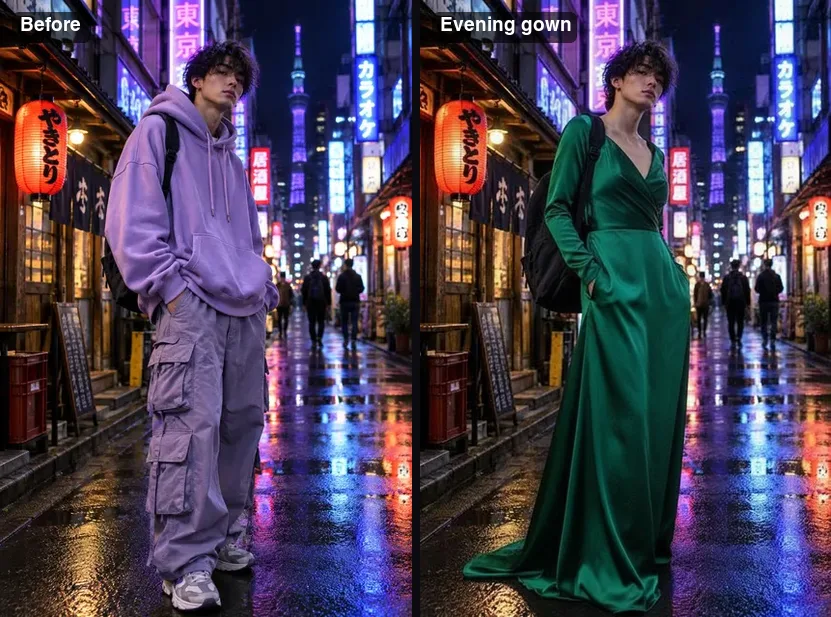 Example · made with RegiAI
 Saved to your workspace history.
The RegiAI AI dress changer lets you see yourself in a new dress with two choices: a style and, if you like, a color. Pick from ten styles, from an evening gown or wedding dress to a saree, lehenga, qipao or kimono, type something like "emerald green satin", and the AI dresses you in it while keeping your face, hair, body, pose and background.
It is the fastest of our clothing tools because there is nothing to write or find. To try on a specific dress from a shop, upload its photo to the AI Clothes Changer. For anything outside the list, like a suit, costume or a full look, describe it in the AI Outfit Changer. Each dress change costs $0.10, and your first generation each day is free.
A full-body or three-quarter photo of one person works best, so the whole dress has room to appear.
Choose one of ten styles. Optionally add a color or detail, such as "blush pink with lace sleeves" (up to 120 characters).
Click Change dress. In about ten seconds you see yourself in the new dress and can download it as a JPG.
Preview a white wedding dress on your own photo before visiting bridal shops.
See how traditional dress looks on you before a wedding, festival or family event.
Run the same style in a few colors to see which one suits your skin tone and hair.
Compare a prom dress, cocktail dress and evening gown for the same occasion.
Swap a casual outfit for a tailored business dress on a photo for a profile or bio.
Make a set of dress looks from one photo for a mood board, story or group chat.
Preview a color scheme for bridesmaids or decide what to wear as a wedding guest.
Rule out styles that do not suit you at home, so store visits and orders are more focused.
Each style is turned into a detailed instruction for the AI, so you get a consistent, realistic dress without writing a prompt:
The optional color field is where you steer the look: a color ("deep red"), a fabric ("velvet", "chiffon") or a detail ("gold embroidery", "off-shoulder"). Keep it short and specific.
A good approach is to pick the style first and leave the color empty, so you see the default version. Then run it again with two or three colors you are considering. Because the photo, pose and background stay the same, the results line up neatly for comparison. For traditional dress, you can name regional details in the color field, such as "Banarasi silk with a gold border" for a saree or "red with gold phoenix embroidery" for a qipao.
Traditional styles are drawn with their typical draping and details, so a saree wraps and pleats, a lehenga has a full embroidered skirt, and a qipao has its high collar and fitted cut. Adding the fabric, like silk or velvet, makes the result more specific.
All three tools keep your face, pose and background. The difference is how you tell the AI what to wear.
For couple shots in matching outfits, see the AI Couple Photo Generator. For a polished portrait to go with your new look, the AI Professional Headshot tool is a good next step.
In short: choose the dress changer when you know the kind of dress you want and just need to see it on you. Choose the outfit changer when you want to describe something specific or unusual. Choose the clothes changer when you have already found the exact dress online and want to see that one.
Choose a photo where you stand fairly straight with your body visible from head to at least the knees. Long gowns, sarees and lehengas need space to fall; on a head-and-shoulders photo only the neckline can change. Even light and a simple background help the fabric look real. Uploads can be JPG, PNG or WebP up to 10 MB.
Each dress change costs $0.10 from your balance, paid per use with credit packs from $10. There is no subscription. Signed-in users get one free generation per day on tools priced $0.10 or less, and this is one of them; it does not stack. Failed generations are refunded automatically. Results have no RegiAI watermark and stay in My creations in your dashboard for 30 days, where you can download or delete them.
The AI draws a new dress rather than copying a real product, so treat the result as a preview of the style and color, not of a specific garment or its fit. It cannot know your measurements, so a dress that looks great in the picture may still need a different size in real life.
Still stuck? Contact us.