




















Anime profile pictures
Turn a selfie into an anime avatar for Discord, X, Instagram or gaming profiles.
Turn any photo into anime art in seconds, with the scene, pose and composition kept intact.
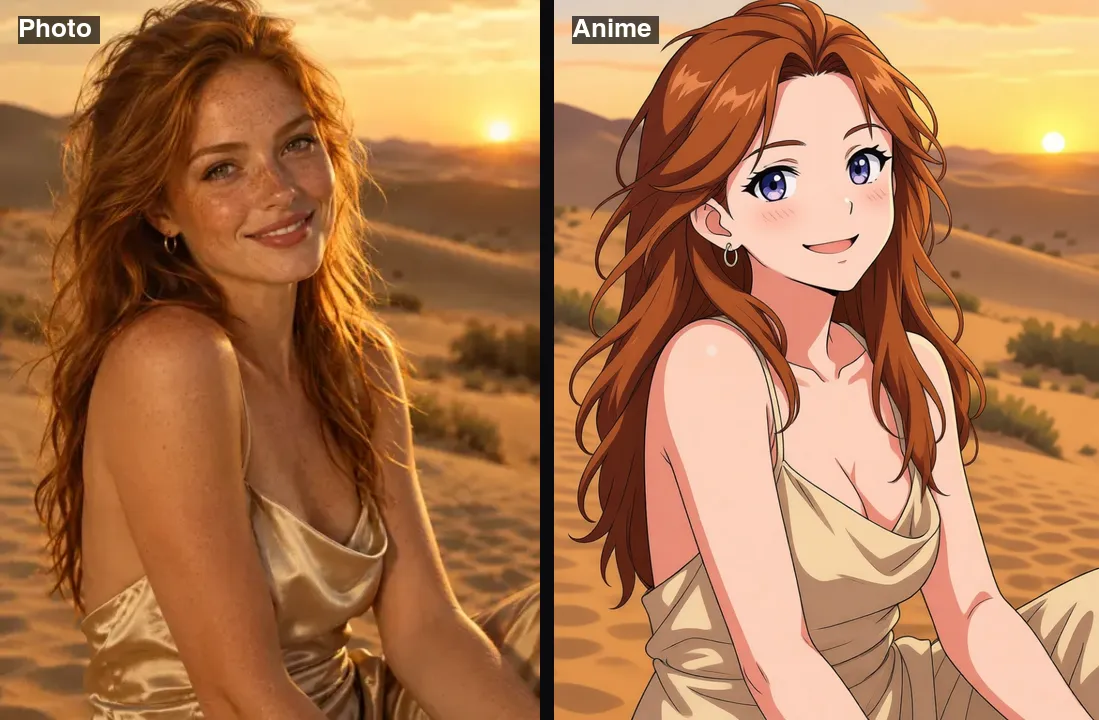 Example · made with RegiAI
 Saved to your workspace history.
The RegiAI AI anime filter turns any photo into anime art in about five seconds. Upload a selfie, a group shot, your dog or a street scene, and it redraws the whole picture in a clean anime style while keeping the pose, composition and scene. There are no settings to tune: one upload, one click.
It costs $0.03 per image and your first generation each day is free. If you want to choose between styles like cartoon, clay, pixel art or Lego, or turn yourself into a samurai or astronaut, try the AI Selfie Generator. To bring your anime picture to life, animate it with Image to Video, or make a whole clip anime with the AI Video Restyle.
JPG, PNG or WebP up to 10 MB. People, pets, rooms and landscapes all work.
Click Convert to anime. The filter redraws the image in anime style, keeping its shape and layout.
Save the JPG in about five seconds and use it as an avatar, post or wallpaper.
Turn a selfie into an anime avatar for Discord, X, Instagram or gaming profiles.
Convert group photos and couple shots so everyone appears as an anime character.
Make your cat or dog look like it stepped out of a Japanese animated film.
Redraw travel photos, streets and rooms as anime backgrounds and wallpapers.
Use converted photos as reference panels for manga, comics or storyboards.
Create before and after posts, or animate the anime version into a short clip.
Turn holiday photos into an anime-style postcard set or a travel diary.
Print an anime version of a couple, family or pet photo as a card or small poster.
The filter uses an image model tuned for anime conversion. It keeps the structure of your photo, meaning the people, their poses, the objects and the camera angle, and redraws everything with anime line work, flat shading and bright colors. The output has the same aspect ratio as your photo.
For the best results:
The filter works on more than faces. Streets, cafes, bedrooms, mountains and city skylines all convert well and make good anime-style wallpapers or backgrounds. Photos taken at golden hour or at night with neon lights tend to give the most striking results, because anime art leans on strong color and light.
RegiAI has a few tools that turn photos into art. Pick based on how much control you want:
If you want a larger file for printing or a wallpaper, run the anime image through the AI Image Upscaler.
A simple rule: if you want the whole photo, including the background, redrawn as anime, use this filter. If you want a stylized portrait of yourself with a choice of art styles and characters, use the selfie generator.
For a full character sheet, combine tools: convert a selfie with the anime filter, try a few other looks in the selfie generator, and turn your favorite into a toy with the action figure generator.
Each conversion costs $0.03 from your RegiAI balance. You pay per use with credit packs of $10, $25, $50 or $100, with bonus credit on larger packs, and there is no subscription. Every signed-in user gets one free generation per day on tools priced $0.10 or less, including this filter; it does not stack or roll over. If a conversion fails, the charge is refunded automatically.
Your anime images have no RegiAI watermark and are saved in My creations in your dashboard for 30 days, where you can download or delete them. Please only convert photos of people who are fine with it.
At three cents per image, a $10 pack covers more than 300 conversions, so you can convert a whole album, try several versions of your favorite photo, or make a matching set of avatars for a group of friends.
The filter is not a face swap and it does not create a new person. It redraws the photo you upload, so the result belongs to the same people and places as the original. Use it for fun and creative projects, and ask before posting an anime version of someone else's photo.
Still stuck? Contact us.