




















Team and office jokes
Swap everyone in the team photo with each other for a farewell card or an office party slide.
Swap up to four faces in a group photo at once. Faces are matched to people from left to right.
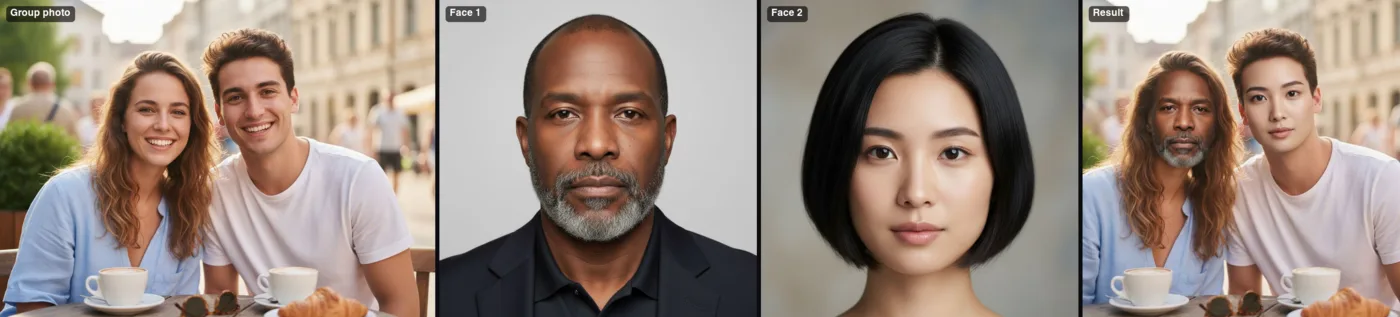 Example · made with RegiAI
 Saved to your workspace history.
Multiple Face Swap replaces up to four faces in a single group photo in one run. You upload the group picture and one face photo for each person you want to change, and RegiAI matches them from left to right: the first face goes on the person furthest left, the second on the next person, and so on. Everyone keeps their own hair, clothes, pose and place in the scene.
Doing this one face at a time with the single AI Face Swap often breaks down in group shots, because a one-face tool has to guess who to change. Here you decide. For moving pictures, see AI Face Swap Video and GIF Face Swap.
A photo with up to four people whose faces are clearly visible, as a JPG, PNG or WebP up to 10 MB.
Upload face 1 for the person on the left, face 2 for the next, and optionally faces 3 and 4. At least two faces are required. Confirm you have permission.
Press Swap faces. The finished photo is usually ready in 20 to 40 seconds and is saved in My creations.
Swap everyone in the team photo with each other for a farewell card or an office party slide.
Put your group of friends in place of a famous band or movie cast for a poster.
Swap parents and kids, or grandparents and grandchildren, for a laugh at a reunion.
Give the bride and groom a picture where the wedding party swapped faces.
Preview how a group costume looks with each friend in a role before the event.
Make a playful cover where the hosts appear as each other or as famous duos you have rights to use.
The tool numbers people in the group photo from the left edge of the image to the right. Face 1 goes on the first person from the left, face 2 on the second, face 3 on the third, and face 4 on the fourth. People you do not upload a face for stay unchanged.
That gives you control, but it also means the order of your uploads matters. Before you start, look at the group photo and note who stands where. Some tips:
Each RegiAI swap tool is built for a different input:
If you want to create a new group scene rather than edit an existing photo, the couple photo generator is usually the better starting point for two people.
Group photos involve several people, and each of them has a say. You must confirm that you have permission to use every face before the tool runs. Do not use Multiple Face Swap to deceive, harass, impersonate or sexualize anyone. Results are saved in My creations for 30 days and can be deleted at any time.
In practice, the easiest way to stay on the right side is to ask. Show the group the result before you post it, and delete it if anyone objects. Be careful with photos of children, colleagues in a work setting and people who are not in the original photo at all, since swapping a stranger's face into your group shot can be as hurtful as the reverse. RegiAI does not add a watermark, so if the image might be taken as real, say it is edited when you share it.
Still stuck? Contact us.
$0.35 per group photo, whether you swap two, three or four faces. It is paid from your RegiAI balance; there is no subscription. See pricing.
No. The daily free generation covers tools priced $0.10 or less. You can use it on the single-face AI Face Swap instead.
Up to four. Two face photos are required and the third and fourth are optional.
Faces are matched to people from left to right in the group photo: face 1 goes on the leftmost person, face 2 on the next, and so on.
They stay unchanged. Only the people you upload a face for are swapped.
Yes. Crop each person's face from the group photo, save them as separate images, and upload them in the new order.
Usually 20 to 40 seconds.
No. RegiAI does not add a watermark to AI results.
JPG, PNG and WebP images up to 10 MB each. Convert iPhone HEIC photos with the free HEIC converter first.
Not at the moment. AI Face Swap Video and GIF Face Swap each replace one face.
Failed generations are refunded to your balance automatically.
In My creations in your dashboard for 30 days. You can delete them at any time.
You can use results under our Terms of Service and the model provider's license, if you have the rights to the photo and consent from everyone in it.
Yes, but only up to four faces are replaced, starting from the left. Everyone else stays as they are.
Yes. Multiple Face Swap is available through the RegiAI API at the same price. See the API docs.