




















Remaker AI Alternative: Face Swap Photos, Videos and GIFs on RegiAI
By RegiAI ·
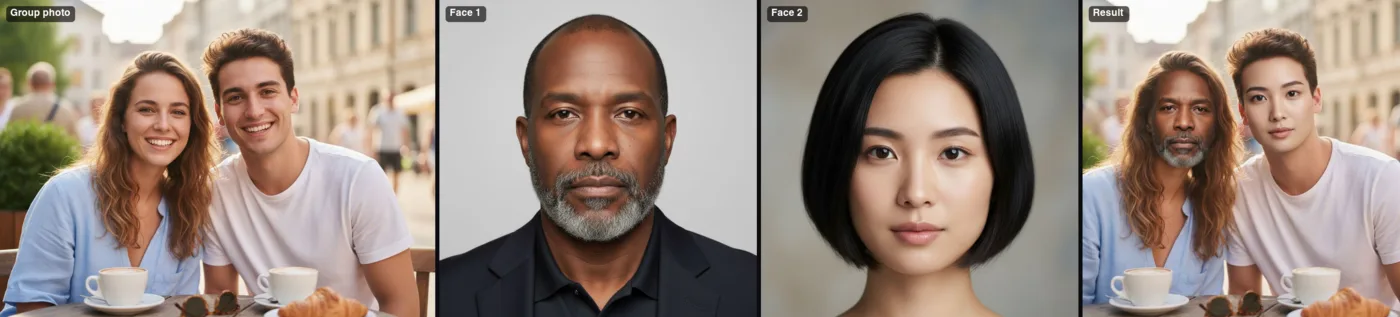
Remaker AI is one of the most searched AI photo sites in the world, and a large share of those searches are about face swapping. If you have used it and want to see what else is out there, or you are choosing a face swap tool for the first time, this guide compares Remaker AI with RegiAI. We cover what each one offers, how the pricing works, and where each one is the better pick. All competitor details below are what we saw on their public pages as of September 2026. Prices and features on any AI site change often, so check their site before you buy.
What Remaker AI is and who it suits
Remaker AI is a general AI image and video toolkit. Its home page lists an AI photo editor, image upscaler, background remover, magic eraser, AI image generator, portrait and headshot generators, a tattoo generator, a video generator, a video enhancer and a set of photo effects. Face swap for images and video is one part of that larger set.
A few things stand out from its public pages as of September 2026:
- Credits, not a subscription. Remaker AI sells one-time credit packs, from $5.99 for 200 credits up to $299 for 20,000 credits, and says there is no recurring charge.
- Free credits on sign-up. New users get free credits that can be used to export images and videos without a watermark.
- Apps on many platforms. It says it is available on Windows, Mac, iOS and Android, with one account across devices.
- Several face swap modes. Its face swap page covers single-face photos, multi-face photos, video and GIF swaps, and batch swaps.
That makes Remaker AI a good fit for people who want one account for many kinds of photo edits, like to work in a phone or desktop app, and prefer buying credits over a monthly plan. If you do a bit of everything (upscaling, background removal, headshots and the occasional face swap), a broad toolkit like this is convenient.
What people look for in a Remaker AI alternative
When people search for an alternative to a tool they already know, it is usually for one of a few reasons:
- Clear per-result prices. Credit systems are flexible, but it can take some math to work out what one video swap actually costs. Some people prefer a price in dollars next to the button.
- Specific face tools in one place. A photo swap, a video swap, a GIF swap, a group photo swap, a head swap and a body swap each solve a different problem. Having them all under one balance saves time.
- No watermark on paid and free results. A watermark makes a result hard to use in a meme, a birthday card or a short video.
- Refunds when a generation fails. AI models sometimes fail on a difficult photo. Paying for a failed result is frustrating.
- An API. Developers who want to add face swapping to their own app need programmatic access, not just a web page.
RegiAI was built around those points, so it is worth a look if any of them match what you need.
RegiAI face tools, one by one
RegiAI is a browser-based set of AI tools with a single pay-as-you-go balance. For faces, there are six tools, each with a fixed price in US dollars.
Photo face swap ($0.10)
The AI Face Swap tool takes two photos: the photo you want to change, and a photo of the face you want to put in it. It swaps the face and keeps the hair, body, clothing and background of the first photo. Each swap costs $0.10, and because it is priced under $0.10, it is covered by the free daily generation described below.
Video face swap ($0.75 per clip)
AI Face Swap Video replaces a face in a short clip, frame by frame. You upload a clear face photo and an MP4 or MOV clip up to 10 seconds long and up to 50 MB. The output is a 720p MP4. It costs $0.75 per clip and is usually ready in one to three minutes. The 10-second limit is the main trade-off: RegiAI is built for short clips such as reaction videos and social posts, not for long recordings.
GIF face swap ($0.75 per GIF)
GIF Face Swap works the same way but takes an animated GIF (up to 10 seconds and 20 MB) and gives you back a GIF, not a video file. That matters if you want to post the result in a chat app or forum that expects GIFs.
Multiple face swap ($0.35 per photo)
Multiple Face Swap handles group photos with up to four people. You upload the group photo plus one face for each person you want to change. Faces are matched to people from left to right, so the first face goes to the person on the far left, and so on. Anyone you do not give a face to stays unchanged.
Head swap ($0.10)
AI Head Swap moves the whole head, including hair and head shape, from one photo onto the body in another. Use it instead of a face swap when the two people have very different hairstyles, because a face swap keeps the original hair and can look odd.
Body swap ($0.10)
AI Body Swap is the reverse: it keeps your face and hair and takes the body, pose, outfit and scene from a second photo. It is useful for trying yourself in a costume or a sports kit, or placing yourself into a scene you like.
If you want to replace a whole person in a video rather than only the face, AI Character Replace swaps in a character from an image while keeping the motion, for $0.75 at 720p or $1.50 at 1080p.
Remaker AI vs RegiAI: comparison table
The table below uses only what we could verify on each site as of September 2026. Where a site did not state something on the pages we checked, we say so instead of guessing.
| Remaker AI | RegiAI | |
|---|---|---|
| Face tools | Photo, multi-face, video, GIF and batch face swap | Photo, video, GIF, multiple faces (up to 4), head swap, body swap |
| Other tools | Wide photo and video toolkit (upscaler, background remover, headshots and more) | Wide toolkit as well; face tools share one balance |
| Pricing model | One-time credit packs, $5.99 (200 credits) to $299 (20,000 credits), no subscription | Pay-as-you-go dollar balance: $10, $25, $50 or $100 packs, no subscription |
| Price per result | Charged in credits; per-tool credit costs were not listed on the pages we checked | Fixed dollar price per tool: $0.10 photo swap, $0.10 head or body swap, $0.35 group swap, $0.75 video or GIF |
| Free usage | Free credits for new users | One free generation per day on tools priced $0.10 or less |
| Watermark | Says free-credit and paid exports are watermark-free | No watermark on any result |
| Video length limit | Not stated on the pages we checked | 10 seconds per video or GIF |
| Apps | Windows, Mac, iOS and Android | Works in any browser; API available |
| Failed generations | Not stated on the pages we checked | Refunded automatically |
In short: Remaker AI is strong if you want native apps and a very broad set of photo tools, and it also avoids subscriptions. RegiAI is a good choice if you want a dollar price on every face tool, a free swap each day, head and body swaps next to face swaps, refunds on failures, and an API. If you need to swap faces in videos longer than 10 seconds, RegiAI is not the right tool today.
How RegiAI pricing works
There is no plan to choose and nothing renews. You add credit to your balance with one of four packs on the pricing page:
- $10 gives $10 of credit.
- $25 gives $27 of credit.
- $50 gives $56 of credit.
- $100 gives $115 of credit.
Each generation takes its listed price from the balance. As a rough guide, $10 covers 1,000 photo face swaps, or 100 head swaps, or 13 video swaps. On top of that, every signed-in account gets one free generation per day on tools priced $0.10 or less, which includes the photo face swap, head swap and body swap. If a generation fails, the charge goes back to your balance (or, if it was your free one, you get the free generation back). Your creations stay in your account for 30 days, so download anything you want to keep.
How to swap a face on RegiAI, step by step
- Sign in with Google. The AI tools need an account so your balance, free daily generation and creations are kept in one place.
- Pick the right tool. Use AI Face Swap for a single photo, Multiple Face Swap for a group, AI Face Swap Video for a clip or GIF Face Swap for a GIF.
- Upload a good face photo. A front-facing, well-lit photo with the face clearly visible works best. Avoid sunglasses, heavy shadows and very small faces.
- Upload the target. This is the photo, clip or GIF you want to change. For videos, trim it to 10 seconds or less first.
- Make sure you have permission to use the faces (the video, GIF and group tools ask you to confirm it), then press the button. Photo swaps take a few seconds; video and GIF swaps usually take one to three minutes.
- Download the result. It has no watermark. It also appears in your creations for 30 days.
If the result is not quite right, the most common fix is a better face photo: sharper, larger in the frame, and facing the camera at a similar angle to the target.
Use face swap responsibly
Face swapping is fun for memes, birthday videos, cosplay previews and jokes between friends. It can also hurt people when it is misused. On RegiAI, and on any other tool:
- Only use faces of people who have agreed, or your own face.
- Do not make content that pretends to be real in order to deceive, such as fake news clips, fake endorsements or fake evidence.
- Never create sexual or humiliating content of anyone, and never use images of minors in this way.
- When you share a swapped image or video, make it clear that it was edited with AI.
The RegiAI video, GIF, group and body swap tools ask you to confirm you have permission to use the faces before they run, and content that breaks these rules is not allowed on any tool.
Which one should you use?
If you already use Remaker AI for many kinds of edits, like its apps and do not mind working in credits, there is no strong reason to move everything. If face swapping is your main job and you want simple dollar prices, a free swap each day, head and body swap in the same place, and no watermark on anything, try RegiAI with a photo face swap first. It costs $0.10, and your first one each day is free. For more guides, see the RegiAI blog.
Frequently asked questions
Is RegiAI free like Remaker AI?
RegiAI gives every signed-in account one free generation per day on tools priced $0.10 or less, which includes the photo face swap, head swap and body swap. Other tools are paid from a pay-as-you-go balance. Remaker AI, as of September 2026, gives new users free credits on sign-up.
Does RegiAI add a watermark to face swaps?
No. RegiAI does not add a watermark to any result, free or paid.
How long can a video be for face swap on RegiAI?
Up to 10 seconds per clip, as MP4 or MOV up to 50 MB. GIFs can also be up to 10 seconds. Each costs $0.75.
Can I swap several faces in one group photo?
Yes. Multiple Face Swap swaps up to four faces at once for $0.35. Faces are matched to people from left to right.
Do I need a subscription?
No. RegiAI uses one-time top-ups of $10, $25, $50 or $100, and larger packs add bonus credit. Nothing renews automatically.
What happens if a face swap fails?
The charge is refunded to your balance automatically. If it was your free daily generation, you get it back.
Can developers use RegiAI face swap in their own app?
Yes. RegiAI has an API that uses the same balance and prices as the website.