




















Damage Repair
Automatically detect and repair scratches, tears, stains, and other physical damage to restore your photos.
Fix scratches, damage, and colorize old photos with AI technology.
🎁 First one FREE! Then $0.10
You'll be asked to sign in with Google before processing.
By uploading an image you agree to our Terms of Use and Privacy Policy.
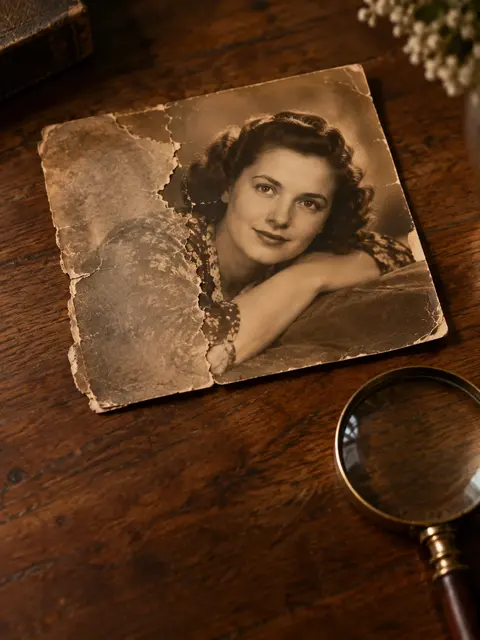 Example · made with RegiAI
Our AI-powered photo restoration tool can fix damage, remove scratches, and even colorize black and white photos.
Automatically detect and repair scratches, tears, stains, and other physical damage to restore your photos.
Bring black and white photos to life with realistic AI-powered colorization that preserves historical accuracy.
Improve image quality, adjust brightness and contrast, and enhance details for crystal-clear results.
Your photos are processed securely and automatically deleted after processing. We never store your images.
Powered by advanced AI technology for professional-grade photo restoration results.
Get your restored photos in under 60 seconds. No waiting, no complicated software installations.
RegiAI AI photo restoration repairs old, damaged photos in one step. Upload a scan of a print with scratches, cracks, tears, stains or faded color, and the AI cleans up the damage and brings back a natural, colorized version of the picture. There is nothing to retouch by hand.
Your first restoration is free, so you can see the result on a real family photo before paying anything. After that, each photo costs $0.10. If your photo is in good shape and only needs color, the AI Photo Colorizer is cheaper at $0.03. If it is mainly blurry, try Unblur Image.
A scan or phone photo of the print, as a JPG, PNG, WebP or GIF up to 10 MB.
Click Restore Photo. The AI fixes scratches, cracks, stains and fading and adds natural color.
Save the restored photo. It also stays in your creations for 30 days.
Repair cracked portraits of parents and grandparents and see them in color.
Clean up stains, creases and fold lines from photos kept in boxes or albums.
Bring back contrast and color to 1970s and 1980s prints that turned orange or pale.
Restore a special photo to print and frame for a birthday, anniversary or memorial.
Prepare old photos for a family tree, a photo book or a genealogy site.
Use restored photos in a tribute video or bring one to life with Image to Video.
Send clean digital copies to family members who have never seen the original print.
Repair creased service photos, class pictures and old ID portraits.
A good scan gives the AI more to work with, and it is easy to get right.
After restoring, you can enlarge the photo for printing with the AI Image Upscaler, or fix a single detail with the AI Image Editor.
Very large tears or missing pieces, for example a corner that is gone completely, are the hardest case. The AI fills them in, but it can only guess what was there. Photos where the faces are intact and the damage is around them usually give the best results.
RegiAI has several tools for old photos. They overlap a little, so here is when each one makes sense:
Keep in mind that AI restoration rebuilds missing areas and chooses colors based on what is typical. Faces usually stay recognizable, but small details in badly damaged areas are the AI's best guess. For family photos this is usually exactly what people want; for historical or legal records, label the result as restored.
If you have a big box of photos, start with the free restoration on the one that matters most. Then work through the rest at $0.10 each: a $10 credit pack covers a hundred photos. For prints that are only faded or discolored, compare the result with the cheaper colorizer, since you may not need a full restoration.
Every account gets its first photo restoration for free. You still sign in with Google, but no credit is needed for that first one. If the free attempt fails, it does not count, and you can try again.
After the first one, each restoration costs $0.10 from your RegiAI balance. There is no subscription: credit packs cost $10, $25, $50 or $100, and larger packs include bonus credit. If a paid restoration fails, the $0.10 is refunded to your balance automatically. RegiAI does not add a watermark to restored photos, and they are saved in My creations in your dashboard for 30 days, where you can download or delete them.
This first-restoration offer is separate from the daily free generation that RegiAI gives on some other AI tools: photo restoration does not use the daily free generation, so after your first free photo every restoration is charged at $0.10. Compared with a professional retoucher, who may charge several dollars or more per photo, AI restoration is a quick way to repair a whole album. For a single irreplaceable photo with very heavy damage, a skilled human retoucher can still be worth it.
Still stuck? Contact us.