




















Social posts and ads
Make eye-catching visuals for posts, ads and banners in the exact shape each platform needs.
Turn text into images with the best AI models in one place: Nano Banana, FLUX, Ideogram, Recraft, Seedream, Qwen and more.
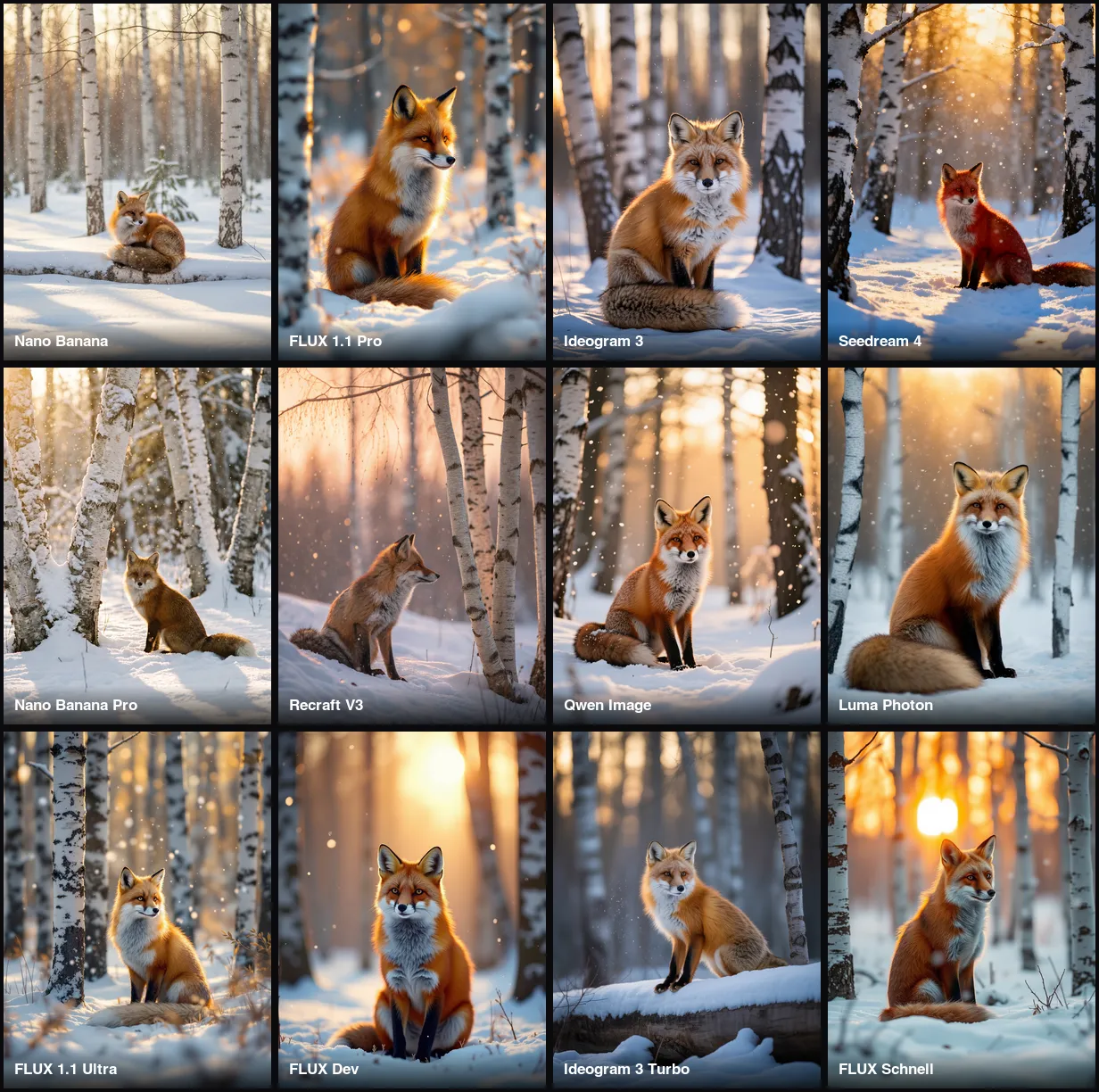 Example · made with RegiAI
 Saved to your workspace history.
The RegiAI AI image generator turns a text prompt into an image with your choice of 12 models: Google Nano Banana and Nano Banana Pro, FLUX Schnell, Dev, 1.1 Pro and 1.1 Pro Ultra, Ideogram 3 Turbo and Quality, Recraft V3, Seedream 4, Qwen Image and Luma Photon. You pay per image, from $0.01, and the price is shown next to each model before you generate.
Having every model on one page means you can run the same prompt on two or three of them and keep the best, instead of paying for separate subscriptions. To edit a photo you already have, use the AI Image Editor or Nano Banana AI with a reference image. To make a finished image bigger, send it to the AI Image Upscaler.
Write up to 2,000 characters: the subject, setting, style, lighting and camera angle. Specific prompts give better images.
Choose one of 12 models, each with its own look and price, and an aspect ratio: 1:1, 3:4, 4:3, 9:16 or 16:9.
Most images are ready in 5 to 20 seconds. Download the JPG or find it later in your creations.
Make eye-catching visuals for posts, ads and banners in the exact shape each platform needs.
Ideogram 3 and Recraft V3 render words and logos cleanly, so they suit posters, covers and signs.
Create studio-style product shots and interiors without booking a photographer.
Explore photo, illustration, 3D and painting styles quickly before you commit to one.
Generate a header image or thumbnail background in 16:9, then add your title.
Illustrate a story, a presentation or a lesson with a picture that shows exactly your idea.
Design characters, mascots and profile pictures in any art style.
Run one prompt on several models and keep the result you like best.
Every model on this page has strengths. A quick guide, with the price per image:
A practical workflow: test your prompt on FLUX Schnell, then run the final version on the model that suits the job. If you want to edit an existing image rather than start from text, Nano Banana AI takes a reference photo.
Aspect ratio matters as much as the model. Use 1:1 for feeds and avatars, 3:4 or 9:16 for portraits, stories and reels, and 16:9 or 4:3 for banners, slides and video thumbnails. Choosing the right shape up front avoids cropping away part of the image later.
Good prompts read like a short photo brief. Include:
Avoid stacking many unrelated ideas in one prompt. If the result is close but not right, change one thing at a time. When the image is done, you can remove its background with the Background Remover, widen it with the AI Image Expander, or bring it to life with Image to Video.
A few example prompts to start from: "a cozy Scandinavian living room with warm afternoon light, interior photography"; "portrait of an elderly fisherman with a white beard, dramatic window light"; "a tiny astronaut exploring a giant mushroom forest, whimsical 3D render"; "minimal poster with the words HELLO SUMMER in bold retro type, pastel colors". Swap the subject and keep the structure, and you will get consistent results across models.
Partly. Every signed-in user gets one free generation per day on AI tools priced $0.10 or less. On this page that covers every model except FLUX 1.1 Pro Ultra, Ideogram 3 Quality and Nano Banana Pro. The free generation does not stack or roll over.
After that you pay per image from your RegiAI balance. There is no subscription: credit packs cost $10, $25, $50 or $100, and the larger packs include bonus credit. At $0.01 per image, a $10 pack covers a thousand FLUX Schnell drafts. If a generation fails, the charge is refunded to your balance automatically.
Images have no RegiAI watermark, and they are saved in My creations in your dashboard for 30 days, where you can download or delete them.
Paying per image suits most people better than a monthly plan. If you make a handful of images a week, you might spend a dollar or two a month, and you never lose unused credit at the end of a billing cycle. If you need hundreds of images, the cheaper models keep costs low, and you only pay premium prices for the images that need premium quality.
Still stuck? Contact us.